AI learning assistant

The virtual AI Professor that reads the lesson along with you

You stop pasting text into a separate chat. In our courses for professionals, the professor receives the lesson you have open and answers starting from it: it explains a passage, gives you an example from practice, summarizes the lesson and tests you. You type or you talk, in English.

  • Included in every plan and in per-course access
  • Text and voice, in English
  • Conversations are not used to train AI models

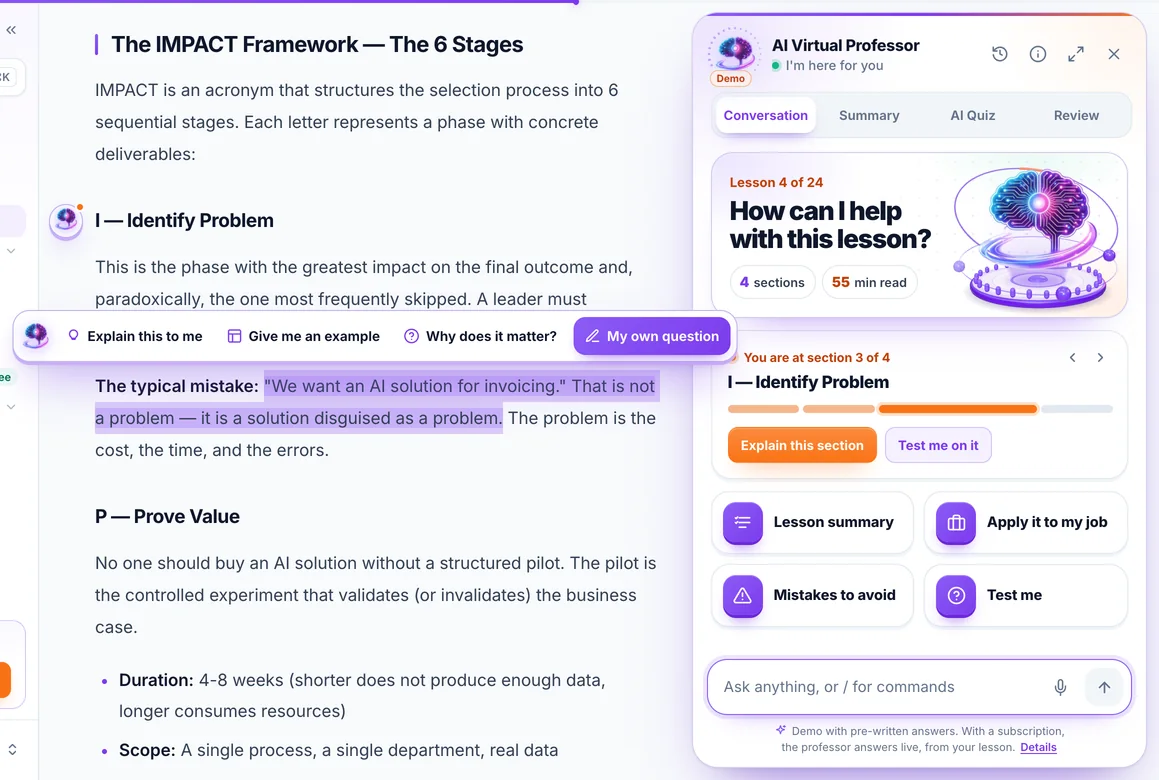
Screenshot from the app, on the lesson “The IMPACT Framework” from the course “AI for Business Leaders”: a selected passage, with the professor’s bar above it, and the professor panel next to the lesson. Answers are generated by AI and may contain errors.

An AI learning assistant that works in the lesson, not in another tab

You copy nothing into a separate chat. The professor appears in three places in the lesson, depending on how much you want to work with it.

On the text you are reading

You select a passage and get the explanation next to it

The professor’s bar appears, with “Explain this to me”, “Give me an example”, “Why does it matter?” and “My own question”. The answer is written right under the passage: you can listen to it or continue it in the conversation.

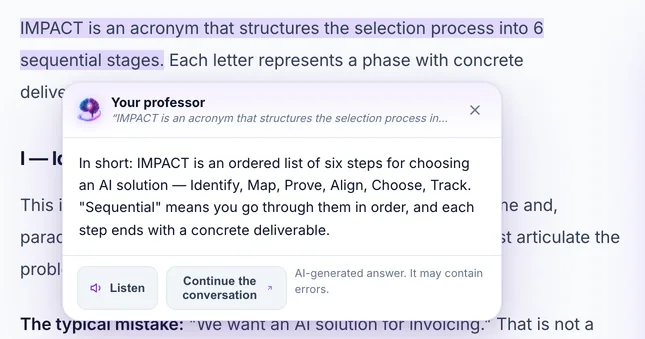
The bar that appears when you select a passage: “Explain this to me”, “Give me an example”, “Why does it matter?” and “My own question” The professor’s answer shown under the passage selected in the lesson, with the “Listen” and “Continue the conversation” buttons
Next to the lesson

A panel that knows which section you have reached

You open it from the “Ask the professor” button or with ⌘J (Ctrl J on Windows). On wide screens, the page makes room for it next to the text. It shows you the section you are at and explains it or tests you on it, in one click.

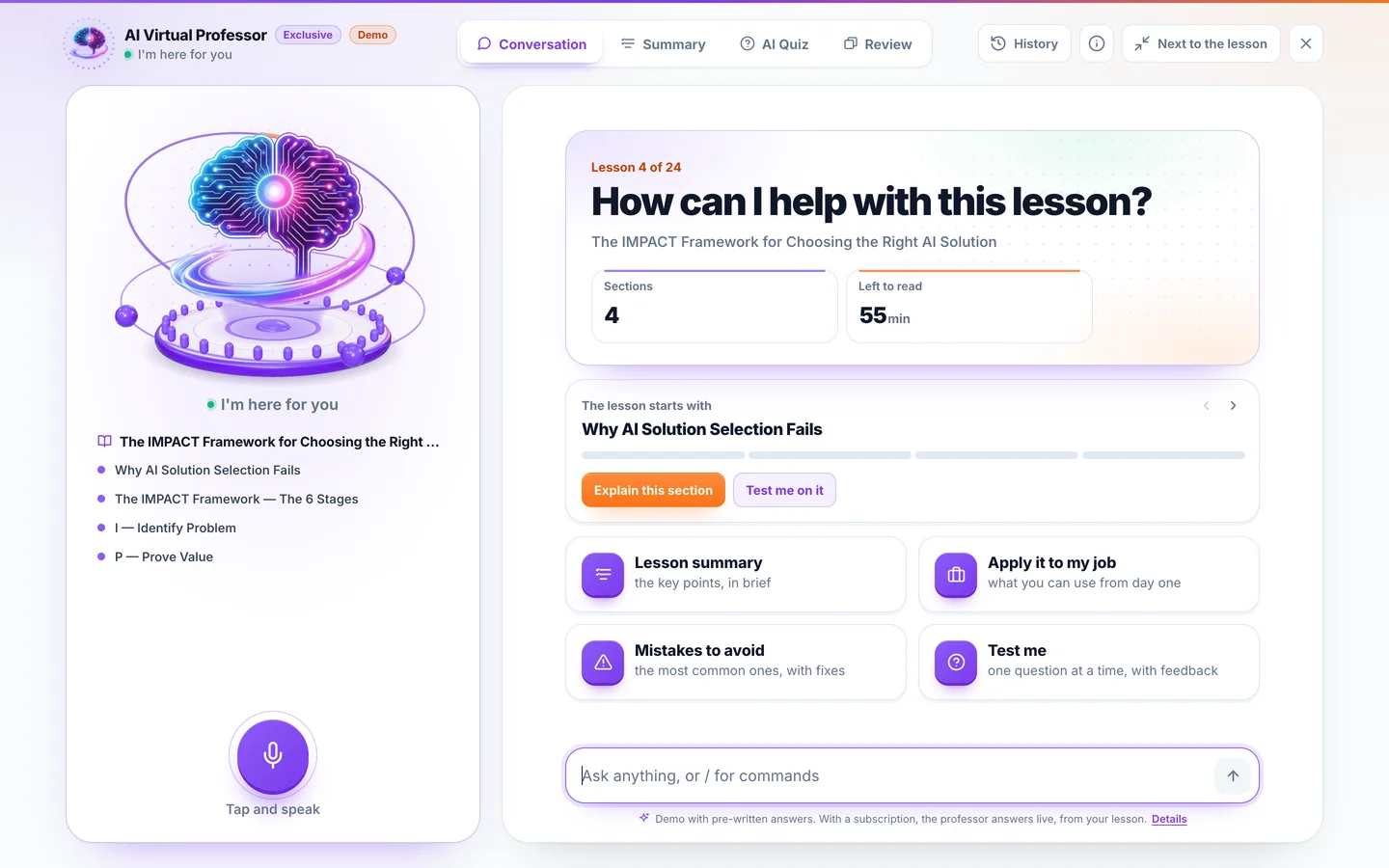
The professor panel open next to the lesson: “How can I help with this lesson?”, the lesson section it is on and the four starters
On the full screen

A session with just the professor

The same professor, with the lesson sections on the left and the microphone at hand. When you are done, you go back next to the lesson in one click.

On a phone, the panel opens as a sheet over the lesson.

The full-screen session: the professor’s stage, the list of lesson sections, the starters and the question field

Four tabs, four ways to work with the lesson

They are the panel’s tabs, as you find them in the app. Pick one to see what it does.

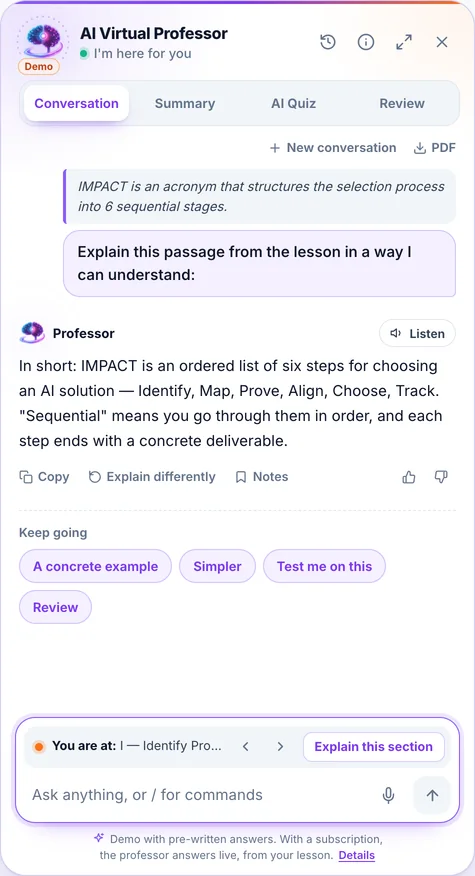
The conversation with the professor: the passage quoted from the lesson, its explanation and the “Copy”, “Explain differently” and “Notes” actions

You ask in writing or by voice

  • You do not explain the context: it receives the lesson you have open.
  • When it relies on the lesson, the answer usually names the section, and the name is a link back to it in the text.
  • On every answer: “Listen”, “Copy”, “Explain differently” and “Notes”, which sends it to your lesson notes.
  • You keep going in one click: “A concrete example”, “Simpler”, “Test me on this”, “Review”.
  • Conversations stay in “History” and can be downloaded as PDF.
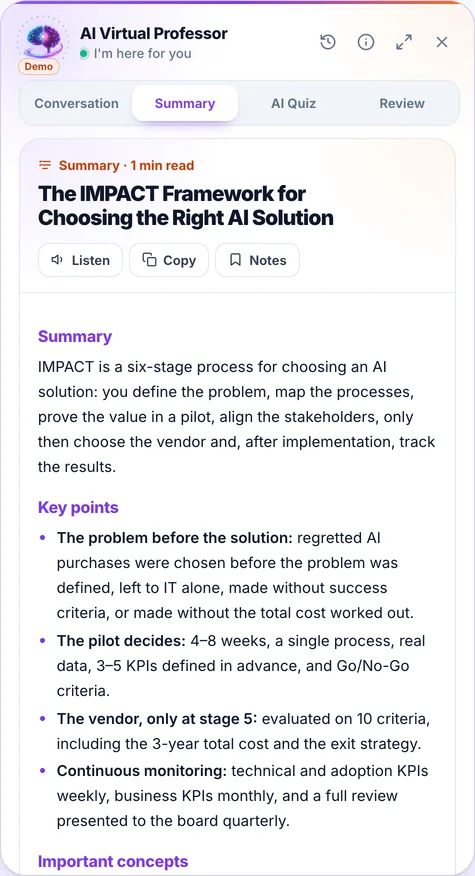
The Summary tab: the key points of the lesson and the “Listen”, “Copy” and “Notes” buttons

The main ideas, when you ask for them

  • It is generated only when you press “Generate the summary”; opening the tab starts nothing.
  • You get the key points and the important concepts of the lesson.
  • You listen to it, copy it or send it to your lesson notes.
  • From here you go further: “Test me on the summary”.
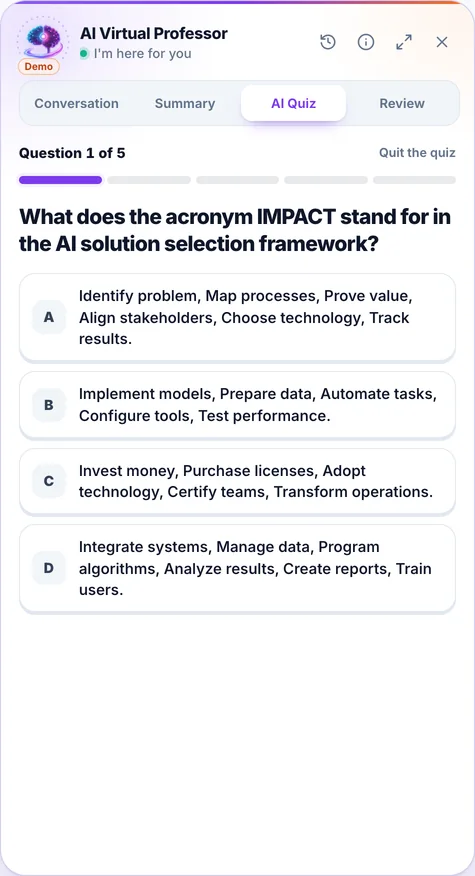
The AI Quiz tab: a question from the lesson with four answer options and the progress bar

You test yourself while the lesson is fresh

  • You choose 3, 5 or 10 questions, generated from the current lesson.
  • After each answer you see the verdict and the explanation.
  • At the end: how many you got right, “Explain my mistake” and a retry of only the questions you got wrong.
  • It is separate from the quiz at the end of the lesson and does not count towards your score.
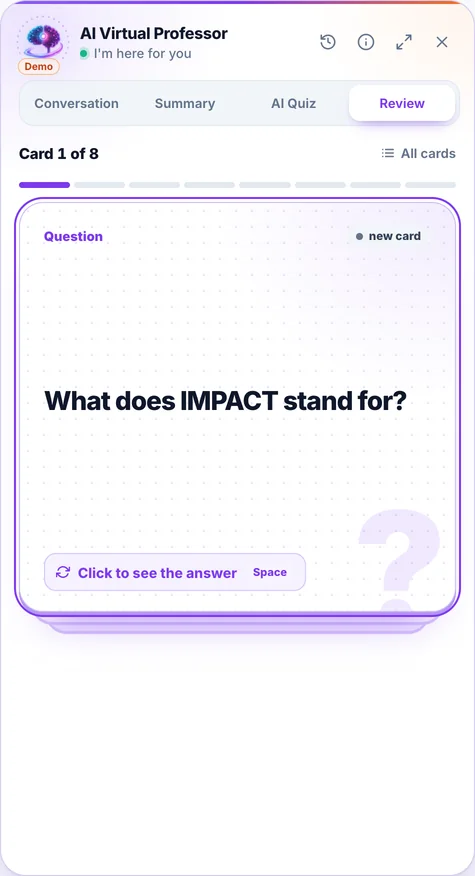
The Review tab: a flashcard with the question “What does IMPACT stand for?”

You remember what matters, with flashcards

  • The cards are generated from the lesson, when you press “Generate the cards”.
  • You flip the card, then choose “Knew it” or “Didn’t know”.
  • The ones you did not know come back in the next round.
  • You also find them under “Review”, in the app menu.

The real app, with the professor open next to the lesson

The demo runs the platform’s app, in a sample account. Pick a starter such as “Mistakes to avoid”, select a passage in the lesson or open Summary, AI Quiz and Review. The answers in the demo are prepared in advance.

cursuri-ai.ro/app Interactive demo · sample account

Demo on an excerpt from the lesson “The IMPACT Framework for Choosing the Right AI Solution”, from the course “AI for Business Leaders”. The professor’s answers are prepared in advance, from the lesson: the demo does not call the real professor, and voice and the microphone are off. With a subscription, the AI Professor answers your question starting from the lesson you have open, reads the answer aloud on request, and you can ask by voice; answers are generated by AI and may contain errors.

Why an AI professor in the lesson, not a chatbot in another tab

A general-purpose AI assistant is still useful. The difference shows when you learn from a specific course.

You do not explain what you are studying

In a separate chatYou copy the passage and describe the course with every question.

With the professor in the lessonThe professor receives the lesson you have open. You just ask.

You do not leave the lesson

In a separate chatYou switch tabs and lose the place where you stopped reading.

With the professor in the lessonYou select a passage and the explanation appears next to it. The panel sits beside the text and knows which section you have reached.

You do not write prompts in order to learn

In a separate chatEvery time, you ask with a prompt for the summary, the questions and the flashcards.

With the professor in the lessonThe summary, a quiz of 3, 5 or 10 questions and the flashcards are made from the lesson, in one click.

What you work on stays in the course

In a separate chatConversations sit in another service, with no link to the lesson.

With the professor in the lessonConversations stay in “History”, a good answer goes into your lesson notes, and the cards go into “Review”.

  • Included in every plan and in per-course access, at no extra cost
  • The content of your conversations is not used to train AI models

The comparison describes the way of working, not the quality of other services. The professor here is built for learning from a specific course.

What it does and what it does not do

We tell you the limits before you pay, not after.

What it does

  • It answers starting from the lesson you have open. On topics from the lesson’s field that do not appear in the text, it fills in from general knowledge.
  • When it relies on the lesson, it usually points to the section.
  • It knows which section of the lesson you have reached: it explains it or tests you on it.
  • It sends an answer to your lesson notes, if you want to keep it.
  • It makes the summary, a quiz and flashcards, only when you ask for them.
  • It reads an answer aloud, on request, and you can ask it by voice.
  • It keeps your conversations in “History”; from the panel you continue them or download them as PDF.

What it does not do

  • It is not a human teacher. It is an artificial intelligence system, and its answers may contain errors, even when they start from the lesson. For important decisions, check official sources.
  • It is not professional advice. On legal, tax, financial or medical topics, the answers are for educational purposes and do not replace a specialist.
  • It does not read very long lessons to the end. It receives the beginning of the text; for a passage further down, you select it and ask for the explanation.
  • It is not without a limit. It has a fair-use limit, calculated based on the complexity of requests. Once you have used more than half of it, the panel shows you how much is left.
  • It starts nothing on its own. Voice, the summary, the quiz and the cards start only when you press.
  • On a phone it has no full-screen session. It opens as a sheet over the lesson, with the same four tabs.
Your conversations stay yours

You find them in your account and can delete them at any time. Their content is not used to train AI models; how the providers process it is described in the Privacy Policy.

When you want a person, you write to the team

You ask your question right from the lesson, in a private thread, visible only to you and to the team, and when we answer you get an email.

The AI Professor comes with the course. You do not pay for it separately.

You have it in every plan and in per-course access, at no extra cost. All prices include VAT.

One course

When you care about a single topic in the catalog

€ 99 per month, VAT included No commitment: stop the renewal anytime

about €4 per hour of course

1 course, your choice of 50 25 hours on average
  • All the course’s lessons, exercises and quizzes, about 354 questions per course on average
  • AI Professor in the lessons, included in your subscription
  • Publicly verifiable Certificate of Completion

Business

Marketing, sales, HR, finance, management, legal. No programming.

€ 299 per month, VAT included Billed monthly: stop the renewal anytime

€12 per month for each of the 25 courses

25 Business courses 25 hours per course on average
  • AI for business, marketing and content, sales and CRM, HR, finance, operations, productivity with Copilot
  • Exercises built on real work scenarios, no code
  • AI Professor in every lesson, quizzes and a certificate for every course

IT Pro

Developers, data engineers, architects. Code and production.

€ 399 per month, VAT included Billed monthly: stop the renewal anytime

€16 per month for each of the 25 courses

25 IT Pro courses 25 hours per course on average
  • Prompt engineering, LLMs, RAG, AI agents and MCP, Claude Code and Cursor, computer vision, MLOps, AI security
  • Hands-on projects with production examples
  • AI Professor in every lesson, quizzes and a certificate for every course

All Access

Best value

The whole catalog, both tracks side by side.

€ 499 per month, VAT included Billed monthly: stop the renewal anytime

€10 per month for each of the 50 courses

All 50 courses about 1,257 hours
  • You save €199 a month compared with the two bundles bought separately
  • Learning paths for both profiles
  • AI Professor in every lesson, quizzes and a certificate for every course

Subscriptions renew automatically; you can stop the renewal anytime from your account, and access stays until the end of the period already paid for. As digital content with immediate access, see the withdrawal conditions.

Integrated
Secure payments powered by Stripe
We never see your card details
Accepted payment methods

Payments are processed by Stripe, a PCI DSS Level 1 certified provider, with 3-D Secure for payer authentication. The connection to this site is TLS-encrypted.

Compare all the plans, including the ones for teams.

Have a team? The same courses, administered in one place

Accounts for your employees, team progress tracking, reports for management and invoices issued to the company.

See the offer for companies
Frequently asked questions

Questions about the AI Professor

What is the AI Professor?

It is the AI learning assistant built into every lesson on Cursuri AI. It receives the lesson you have open and starts from it: it explains the passages you select, gives you examples, summarizes the lesson, tests you with a quiz and prepares review flashcards. You can type or talk to it, in English.

Does the AI Professor cost anything extra?

No. The AI Professor is included in every Cursuri AI plan and in per-course access, at no extra cost. Usage has a fair-use limit, calculated based on the complexity of requests, to prevent abuse; once you have used more than half of it, the professor panel shows you how much is left.

Can I use the AI Professor without a subscription?

The professor answers in the lessons you have paid access to: through a plan, through per-course access, through a gift or through a seat in a company plan. Before you pay, you can see how it works in the demo on the AI Professor page and on each course’s preview page, next to the preview of the first lesson.

How is it different from a general-purpose AI tutor or chatbot?

A general-purpose assistant knows about your course only what you paste or explain to it. The AI Professor automatically receives the open lesson and answers right on its page: the explanation of a selected passage appears next to it, and the summary, the quiz and the review flashcards are one click away. Conversations are saved in your account, and their content is not used to train AI models.

Does the AI Professor know the lesson content?

Yes, it starts from it. With every question it receives the text of the lesson you have open; for very long lessons it receives their beginning, and for a passage further down you select it and choose “Explain this to me”. On topics from the lesson’s field that do not appear in the text, it fills in from general knowledge. When it relies on the lesson, the answer usually points to the section; when the section name appears exactly, it becomes a link that takes you to it in the text.

How does voice chat work?

You press the microphone, speak, and your question is transcribed and sent to the professor. Answers are not read aloud on their own: you listen to them on request, with the “Listen” button, read in a synthetic voice.

Which devices and browsers does it work on?

On computer, tablet and phone, in current browsers. The microphone needs the browser’s permission; without it you type your question, and the rest of the features stay the same. The full-screen session is available on wider screens; on a phone the professor opens as a sheet over the lesson.

Can the AI Professor be wrong?

Yes. It is an artificial intelligence system, not a human teacher, and its answers may contain errors, even when they start from the lesson. For professional, legal, tax or medical decisions, check official sources. If an answer did not help you, you can flag it from the panel, and you can report errors to contact@cursuri-ai.ro. Details in the Terms & Conditions, sections 10.1 and 10.2.

What happens to my conversations?

They are saved in your account: you find them on the “AI Conversations” page and under “History” in the professor panel, where you can continue them or download them as PDF. You can delete them at any time. Their content is not used to train AI models. How AI providers process them is described in the Privacy Policy, section 7.0.

You do not buy on trust: you can read a free preview of the first lesson of the course in the demo, with no account and no payment details, before you pay. After payment, access to the digital content starts immediately, with your express consent, and the price is not refunded for a change of mind (art. 16(m) of Romanian Government Emergency Ordinance no. 34/2014). We do refund, as required by law, in the event of an unremedied lack of conformity. Details in the Terms & Conditions.

The AI Professor is included in every plan

Learn with the AI Professor beside you, from the first lesson

A single course costs €99 per month. The Business plan opens all the non-technical courses for €299 per month, IT Pro the technical ones for €399, and All Access, the whole catalog of 50 courses, costs €499 per month, VAT included.

Immediate access after payment AI Professor included Stop the renewal anytime from your account