- Each employee pays separately, at the price for individuals, VAT included
- The subscription belongs to the person and leaves the company with them
- You have no single place to see who has covered what
- You cannot decide which course is mandatory, or by when
- Separate expense claims and renewals, for each person
For companies
AI courses for companies: your team learns, you see the progress
One subscription for the whole team: 50 AI courses in English, mandatory courses with deadlines, by department or by person, and a dashboard where you see everyone’s progress. When a colleague leaves, the seat stays with the company.
5–50 seats prices excl. VAT invoiced to the company free preview of every course
- 50AI courses in English
- ~25hours of content per course
- 5–50seats in a plan
- ~354assessment questions per course
In short
Why a company plan and not individual subscriptions
The content is the same. What changes is who pays, who keeps the seat and what you can show at the end.
- One payment for the company, at a price excluding VAT, with the invoice issued to the company
- Seats stay with the company: they are freed up and given to another colleague
- A dashboard with everyone’s progress, reports and CSV export
- Mandatory courses with deadlines, by department or by person
- Publicly verifiable certificates, as proof of completion
Plans and pricing
Choose the track and the number of seats
Choose one of 3 tracks and one of 4 team sizes. The price per member goes down as the team grows. Billing is monthly, in EUR, and all amounts exclude VAT, for business customers.
Track
Team size
Prices exclude VAT, for business customers: VAT is calculated at checkout from your company’s country and VAT ID and added on top (EU reverse charge where applicable). The subscription renews automatically every month; you can stop the renewal anytime from the company’s billing portal, and access stays active until the end of the period already paid for. Need more than 50 seats? Write to us and we prepare a quote.
What you get, whatever the plan
The same things in all 12 variants: only the catalog and the number of seats change.
- An account for each seat Each employee learns at their own pace, with their own progress and results, separate from their colleagues’.
- The whole catalog of the track The courses in the chosen track, with their updates, at no cost per course.
- The AI Professor in every lesson It answers questions, in writing or by voice, so that nobody stays stuck.
- A publicly verifiable certificate For each course completed in full, with a unique code that anyone can confirm.
- The management dashboard Seats, departments, mandatory courses with deadlines, reports and an activity log.
- Invoice issued to the company You enter the company’s details at checkout, and the invoices stay on the company’s billing page.
The plan moves with the team
- The seat of an employee who leaves is freed up and can be given to someone else
- To move to a bigger plan you write to us: for plans billed in EUR, we change the number of seats for you
What is not included
- Courses taught by a human instructor, in a classroom or online
- Content written specifically for your company
- Single sign-on (SSO) or integration with your own training system
- A state-recognised qualification: the certificate is a private attestation
The content
What the people on your team learn
50 courses written in English, organized by category. Each course has on average ~25 hours of content and ~354 assessment questions, with explanations after every answer.
Business
25 coursesFor people who use AI in their day-to-day work: marketing, sales, HR, finance, operations, legal, management.
-
AI for Business 8 courses
-
AI in Marketing 7 courses
-
AI Productivity 6 courses
-
AI in HR & Management 1 course
-
AI in Operations & Finance 3 courses
IT Pro
25 coursesFor technical teams: AI-assisted development, agents, integrating models into the product, data and infrastructure.
-
AI Engineering 8 courses
-
AI for Developers 9 courses
-
MLOps & Deployment 3 courses
-
Deep Learning & AI Models 5 courses
Example from the catalog
AI for Business Leaders
The complete AI masterclass for leaders and management — updated for 2026
The AI Professor answers questions in every lesson, in writing or by voice. It is an artificial intelligence system, not a person, and its answers can contain errors and should be checked before being used at work.
The assessments come after the lessons, with an explanation for every answer. The certificate is issued when the course has been completed in full, with an average assessment score of at least 70%.
Administration
How you run the training program, from the app
The administrator account has a dashboard separate from the learners’: that is where you hand out seats, make courses mandatory with a deadline and see what each person has covered.
1
You hand out and take back seats, without going through us
You send invitations by email, one at a time or as a list, with a message of your own. Each invitation is valid for 7 days and can be resent or withdrawn. When an employee leaves, you remove them from the team and the seat stays with the company, for someone else.
- A quick invitation or a list of addresses, with a personal message
- Visible statuses: active members, pending invitations, expired invitations
- The administrator chooses whether or not to take one of the seats in the plan
2
You split the team into departments, each with a manager and onboarding courses
You create departments with a name, a description and a color (from a palette of 10), designate a manager for each and choose the courses assigned automatically to anyone who joins the department. People without a department stay visible separately.
- A designated manager for each department
- Courses assigned automatically when a new member joins
- A department leaderboard, weekly or monthly, by lessons completed
3
You make a course mandatory, with a deadline and a note for the team
You pick the course, choose who it applies to (the whole team, a department or specific people) and set a deadline: none, one week, two weeks, one month or a date you choose. You can add a note of up to 500 characters. Learners see the assignment in their account.
- Three ways to choose who it applies to: the whole team, a department, specific members
- Preset deadlines or a date of your choice
- You track how many have started, how many have finished and who is past the deadline
4
You see what each person has covered and how well they understood it
For each member: the courses started and completed, the lessons covered, the time spent and the average assessment score. You can download everything in CSV format, for your internal report.
- Average completion rate and average score, per member and for the team
- Detail by course: lessons covered and assessments passed
- CSV export for reporting
5
Team reports, and alerts when someone falls behind
Six report sections (Summary, Engagement, Trends, Leaderboard, ROI and Alerts) over 7, 30 or 90 days. The platform calculates a team health score from the utilization rate, the completion rate, consistency and average study time, and flags on its own the cases that need attention.
- Alerts for members who have not started any course and for those with no activity for 14 days or more
- Alerts for sudden drops in activity and for missed deadlines
- A weekly report is emailed to the administrator; you can turn it off from the dashboard
6
Activity log, invoices and a bigger plan on request
Team administration actions go into a log with four categories (invitations, members, assignments, company), with author, time and filters, exportable as CSV. In the same dashboard you see the subscription status and download the invoices. When the team grows, you write to us and we move you to a bigger plan.
- A log you can filter by category, by action and by the author’s department
- The invoices issued, downloadable as PDF
- A billing portal for the card, the billing details and unsubscribing
The proof
At the end, something verifiable remains
An employee who covers the whole course and scores at least 70% in the assessments receives a Certificate of Completion with a unique code. Anyone can verify it publicly, without an account and at no cost.
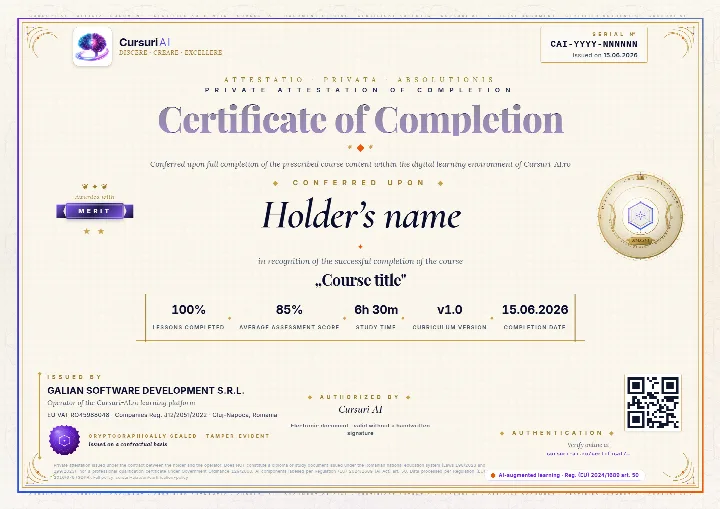
What a recruiter or an auditor actually checks
The public verification page shows the course, the level achieved, the average score and the date. The holder’s name appears only if they choose to make it public.
- The employee finishes the course. They go through all the lessons and pass the assessments, with an average of at least 70%.
- They issue the certificate from their account. A PDF with a unique serial number, the tier earned and a QR code, to add to a CV or to LinkedIn.
- Anyone confirms it is authentic. They scan the code or look up the number on the verification page.
The Certificate of Completion is a private attestation of completing the course on Cursuri-AI.ro. It is not a diploma and it is not a state-recognised qualification under Romanian Laws 198/2023, 199/2023 or Government Ordinance 129/2000; employers may take it into account at their own discretion. Certification policy.
No surprises
Four things you want to know before paying
The conditions are the same for all plans and are written in the Terms & Conditions, not in a separate offer.
Issued to the company, automatically
You enter the company name, VAT / Tax ID, company registration number and registered office address right at purchase. The invoice is issued to the company and sent by email. The prices in the grid exclude VAT: VAT is calculated at checkout from your company’s country and VAT ID and shown separately on the invoice. Payment is by card, through Stripe.
Terms: prices and invoicingYou unsubscribe from the account, whenever you want
The subscription renews automatically every month until you stop it. Unsubscribing costs nothing and is done from the company’s billing portal. The team’s access stays active until the end of the period already paid for, and progress stays saved in the accounts.
Terms: renewal and unsubscribingIt stays your company’s
The company is the controller of its employees’ data, and we process it as a data processor, under the agreement included in the Terms (Art. 28 GDPR). A separate agreement can be signed on request. The dashboard shows progress, time and scores, not an employee’s conversations with the AI Professor.
The data processing agreementYou check for free, before you pay
A preview of the first lesson of any course can be read for free, without an account: that is how you see the level and the style before deciding. After payment access starts immediately, so the price is not refunded for a change of mind. There is no trial period for company plans.
Still have a question before deciding? Write to us or go straight to the plans.
The steps
How you start
No offer to negotiate and no implementation: you choose the plan and invite your people.
-
You choose the plan
The track and the number of seats, from the grid above. The price is the one shown, with no negotiation.
-
You enter the company’s details
Company name, VAT / Tax ID, registration number and registered office address: the details on the invoice.
-
You pay through Stripe
With the company card. The administrator account is activated right after the payment is confirmed.
-
You invite the team
You send the invitations by email. Each colleague creates their account and goes into the first lesson.
Choose your team’s plan
From €799 per month, excl. VAT, for 5 seats.
Frequently asked questions
Questions about company plans
What does a company plan include?
A plan gives access for a fixed number of seats (5, 10, 25 or 50). Each seat is an individual account, with its own progress and results.
- The courses in the chosen track — Business, IT Pro or the whole catalog — with their updates.
- The AI Professor in lessons and the assessments with explanations, included in the subscription.
- A Certificate of Completion for each course finished, publicly verifiable.
- A management dashboard: seats and invitations, departments, mandatory courses with deadlines, progress reports, activity log and billing.
What is the difference between the Business, IT Pro and All Access tracks?
- Business — 25 courses for teams that use AI in office work: marketing, sales, HR, finance, operations, legal and management.
- IT Pro — 25 courses for technical teams: AI-assisted development, agents, integrating models into the product, data and infrastructure.
- All Access — the whole catalog, 50 courses, for companies preparing the entire organization.
The full list is in the course catalog.
How much does it cost and how is the price calculated?
The price depends on the track and the number of seats and is shown in full, for every plan, in the grid of plans for companies — it is not negotiated separately.
- Prices for companies exclude VAT; VAT is calculated at checkout from your company’s country and VAT ID and added on top.
- The larger the team, the lower the price per member compared with an individual subscription.
- Billing is monthly, in EUR.
Prices for individuals are on the pricing page and include VAT.
Do I get an invoice issued to my company?
Yes. At purchase you enter the company name, VAT / Tax ID, company registration number and registered office address, and the invoice is issued to the company.
Payment is by card, through Stripe. On the company’s “Invoices & Subscription” page you find the payment history at any time, with the documents downloadable as PDF.
What happens to the seat of an employee who leaves the company?
You remove them from the team in the management dashboard, and the seat becomes available and can be given to someone else. The number of paid seats stays the same.
Invitations are valid for 7 days. One that has not been accepted can be resent up to 3 times — each resend gives it another 7 days — or withdrawn whenever you want. The administrator can choose whether to occupy a seat too or to keep only the administration role.
Can I make a course mandatory for the team, with a deadline?
Yes. You pick the course and who it is assigned to: the whole team, a department or a specific member.
- Deadline: none, one week, two weeks, one month or a date you choose.
- A note for the team, up to 500 characters, so people know why they are getting the course.
- Tracking: how many have started, how many have finished and who is past the deadline.
Learners see the assignment in their account, with the deadline shown.
Can I organize the team into departments?
Yes. You create as many departments as you need, each with a name, a description and a color.
- A designated manager, if you want one, for each department.
- Onboarding courses assigned automatically to anyone who joins the department.
- A department leaderboard, weekly or monthly, by lessons completed.
Members can be moved between departments at any time, and those without a department stay visible separately.
What reports do I get on employees’ progress?
For each member you see the courses started and completed, the lessons covered, the time spent and the average assessment score. The progress report can be downloaded in CSV format.
The reports section has six parts — Summary, Engagement, Trends, Leaderboard, ROI and Alerts. Engagement compares the last 7, 30 or 90 days with the previous period, and Trends show the evolution by week. The team health score combines the utilization rate, the completion rate, consistency and the average study time.
The platform flags on its own the members who have not started any course, those with no activity for 14 days or more, sudden drops in activity and missed deadlines. A weekly report is emailed to the administrator and can be turned off from the dashboard.
Is there a log of administrative actions?
Yes. Team administration actions are recorded with their author and time, in four categories: invitations, members, assignments and company.
The log can be filtered by category, by action type and by the author’s department, is paginated and can be exported as CSV — useful for internal control.
How do I extend the plan when the team grows?
For plans billed in EUR, we change the number of seats for you: write to us from the Contact page with the plan you want to move to.
The same goes for teams larger than the biggest plan: write to us and we prepare a quote.
How do I unsubscribe, and what happens to access?
The subscription renews automatically every month. You can unsubscribe at any time, at no cost, from the company’s billing portal.
Unsubscribing takes effect at the end of the period already paid for: until then the team keeps full access, and after that progress stays saved in the accounts. No amounts are refunded for a period already started, except in the cases provided by law. Details are in the Terms & Conditions.
How is employees’ data handled?
The company remains the data controller for its employees’ data, and GALIAN SOFTWARE DEVELOPMENT SRL processes it as a data processor, in accordance with Art. 28 GDPR. The clauses are included in the Terms & Conditions (section 12.1) and are accepted when the plan is purchased.
A standalone data processing agreement can be signed on request. Each employee has their own account: the administrator sees the team’s progress and results, not individual conversations with the AI Professor.
What do employees receive at the end of a course?
A Certificate of Completion, issued when the course has been completed in full with an average assessment score of at least 70%. It has a unique number and a QR code, and anyone can verify it publicly, without an account and at no cost.
It is a private attestation of course completion, not a diploma and not a state-recognised qualification. The full conditions are in the Certification policy.
Can we try the platform before paying?
A preview of the first lesson of every course can be read without an account and without paying, from the course catalog. That shows you the level and the style before you decide.
There is no trial period for company plans, and access starts right after payment — which is why the price is not refunded for a change of mind.
For teams
Request a quote for your team
Tell us how many you are and what you are interested in. We reply with an offer within one business day.
Request received
We sent the confirmation to . We reply with an offer within one business day.
Not there? Check Spam or Promotions and move it to Inbox.
Plans for teams
Get your team ready to work with AI
50 courses in English, an account for each employee and reports for management. A preview of the first lesson of every course can be read for free, before you decide.
Plans from €799 per month, excl. VAT
See the plans