The platform, step by step

How Cursuri AI works: from your account to the Certificate of Completion

See the app as it looks today and a learner’s way through it: the free level assessment, the course, the lesson with the AI Professor, the quizzes, the review and the certificate.

  • 50 courses
  • 1,459 lessons
  • ~1,257 hours of content
  • ~354 quiz questions per course
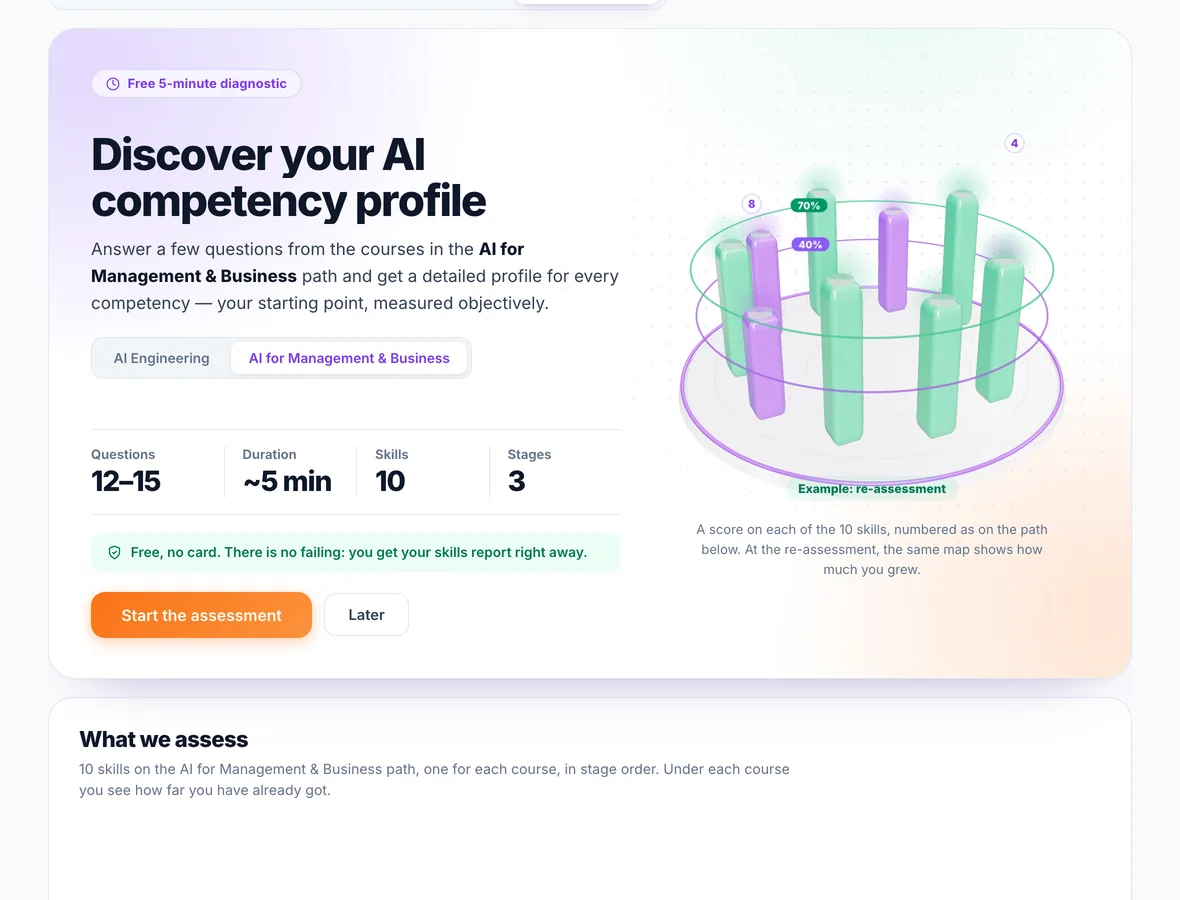
The free AI level assessment in the app, with the number of questions, the duration and the skills it measures
The free level assessment, on a career path. See the step

Screenshots from the app demo, in a sample account.

What happens after you create your account

Seven steps, in the order you go through them. For each one: what you see on screen and what you get, concretely.

Step 1 · Account and assessment

You create an account without payment details and find out where you start

You create the account with your name, your email and a password, or with Google, Facebook or LinkedIn. You are not asked for payment details. The first time you sign in, a short questionnaire puts together a personal plan, with the path recommended for your role and your goal.

  • Free level assessment: in about 5 minutes, you answer questions from the courses of a career path. There is no failing: you get your skills profile right away, with your strengths and what is worth exploring.
  • A free preview of every course: the beginning of the first lesson can be read before you pay, with or without an account.
  • Re-assessment at the end: towards the end of the path you can take the assessment again, with different questions, to see how much you have grown. The re-assessment is included in the plans, not in access to a single course.
See the learning paths

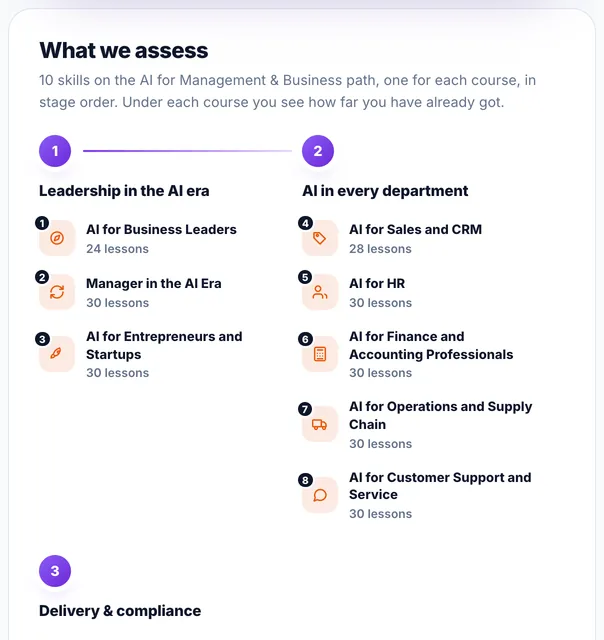
Screenshot from the app demo: what the assessment measures on the “AI for Management & Business” path, one skill for each course.
Step 2 · The course and the plan

You choose what to open, with the whole course outline in front of you

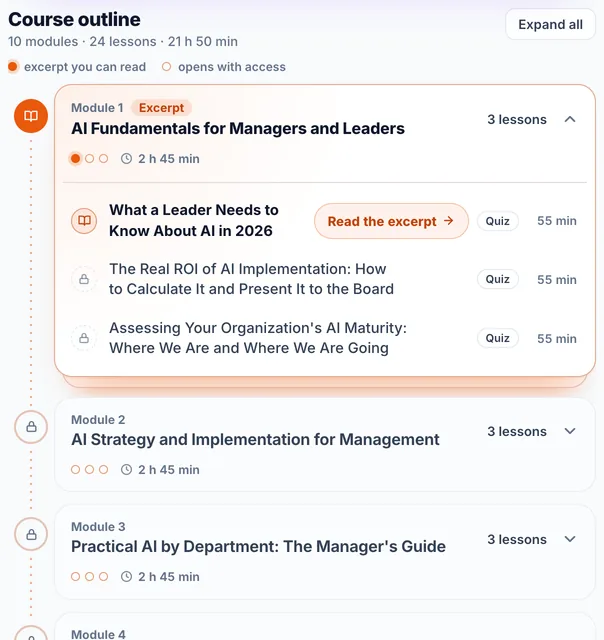
Each course is split into modules, and each module into interactive text lessons, with applied examples and a quiz. The course page lists every module and lesson, with its duration, so you know what you are buying. On average, a course has ~25 hours of content, ~29 lessons and ~354 quiz questions.

  • A single course costs €99 per month, VAT included, and is bought from its own page.
  • Three plans: Business opens the 25 non-technical courses, IT Pro the 25 technical courses, and All Access the whole catalog. They are billed monthly.
  • Payment is by card, through Stripe, and access starts right after confirmation. The renewal is automatic and you can stop it anytime from your account.
  • 8 learning paths put the courses in order, in stages, for a role or a topic. Paths open with the plan for their track.
See all 50 courses

Screenshot from the app demo: the outline of a course, “AI for Business Leaders” (10 modules · 24 lessons · ~22 hours · 284 quiz questions).

Step 3 · The lesson

You learn from the lesson, with the AI Professor beside you

You read at your own pace, with the lesson’s progress bar in view. When you are done, you mark it yourself, with “I understood the lesson”, and next time the Home page takes you straight to the following one, through “Pick up where you left off”.

  • Save, Notes, Review, Focus: you keep the lesson under “Saved lessons”, write your notes next to the text (they are saved automatically and only you see them), schedule your review and hide the menus while you read.
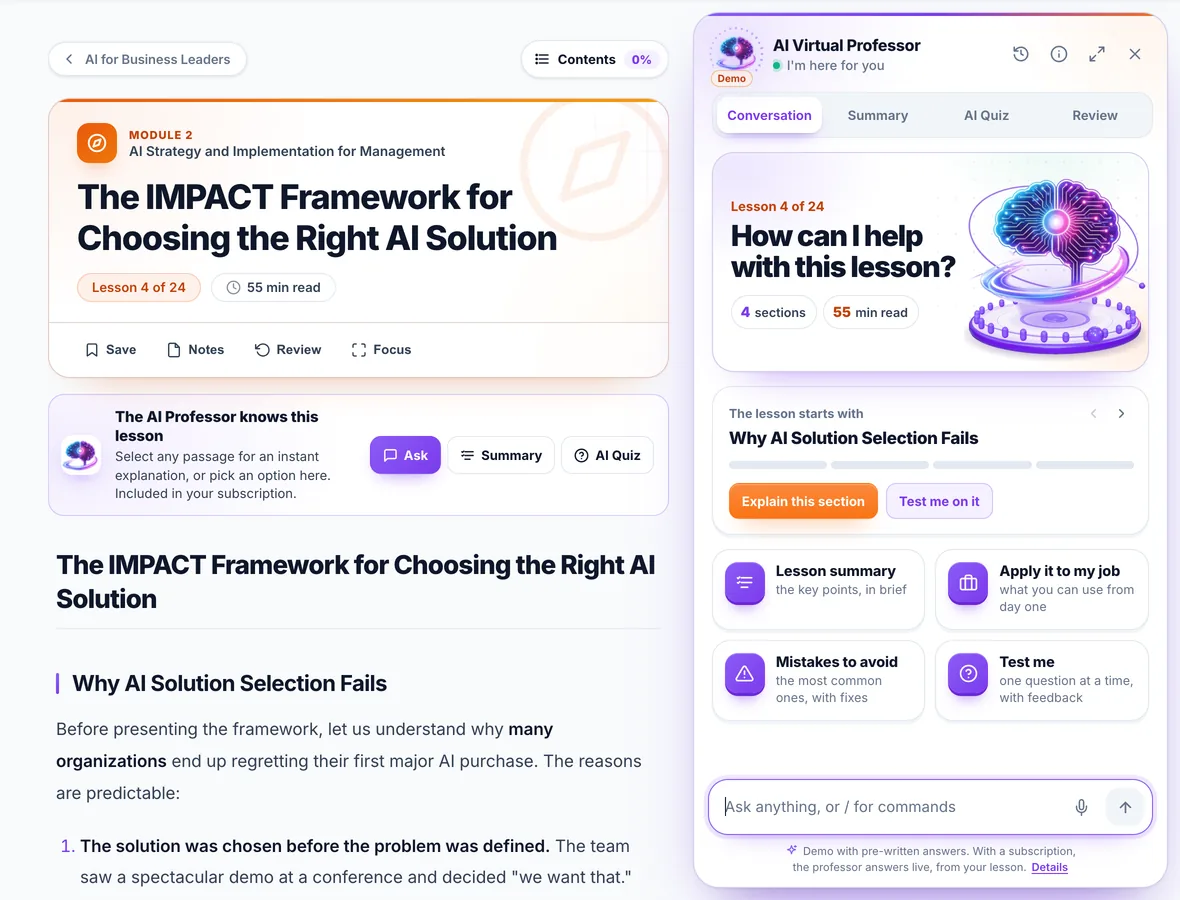
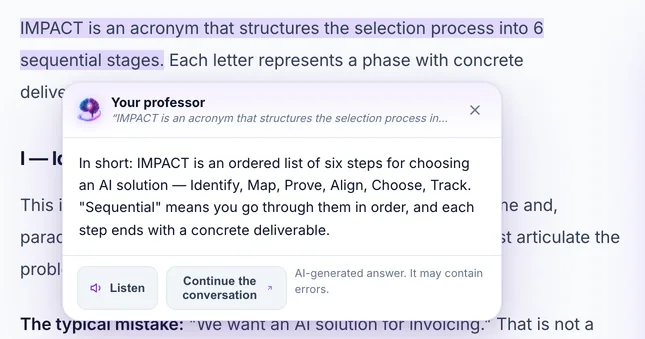
  • The AI Professor receives the lesson you have open: you select a passage and the explanation appears next to it, or you ask it for the summary, a quiz of 3, 5 or 10 questions and flashcards. You write to it or you speak to it.
  • Questions for the team: you write them from the lesson, under “Questions & Answers”, in a private thread, visible only to you and to us. When we answer, you get an email.
How the AI Professor works

Screenshot from the app demo: the professor explains a passage selected in the lesson. The answer in the image was prepared in advance, for the demo; with a subscription, the AI Professor’s answers are generated by an artificial intelligence system and may contain errors.

Step 4 · Quiz and scores

You check yourself after the lesson and see exactly where you stand

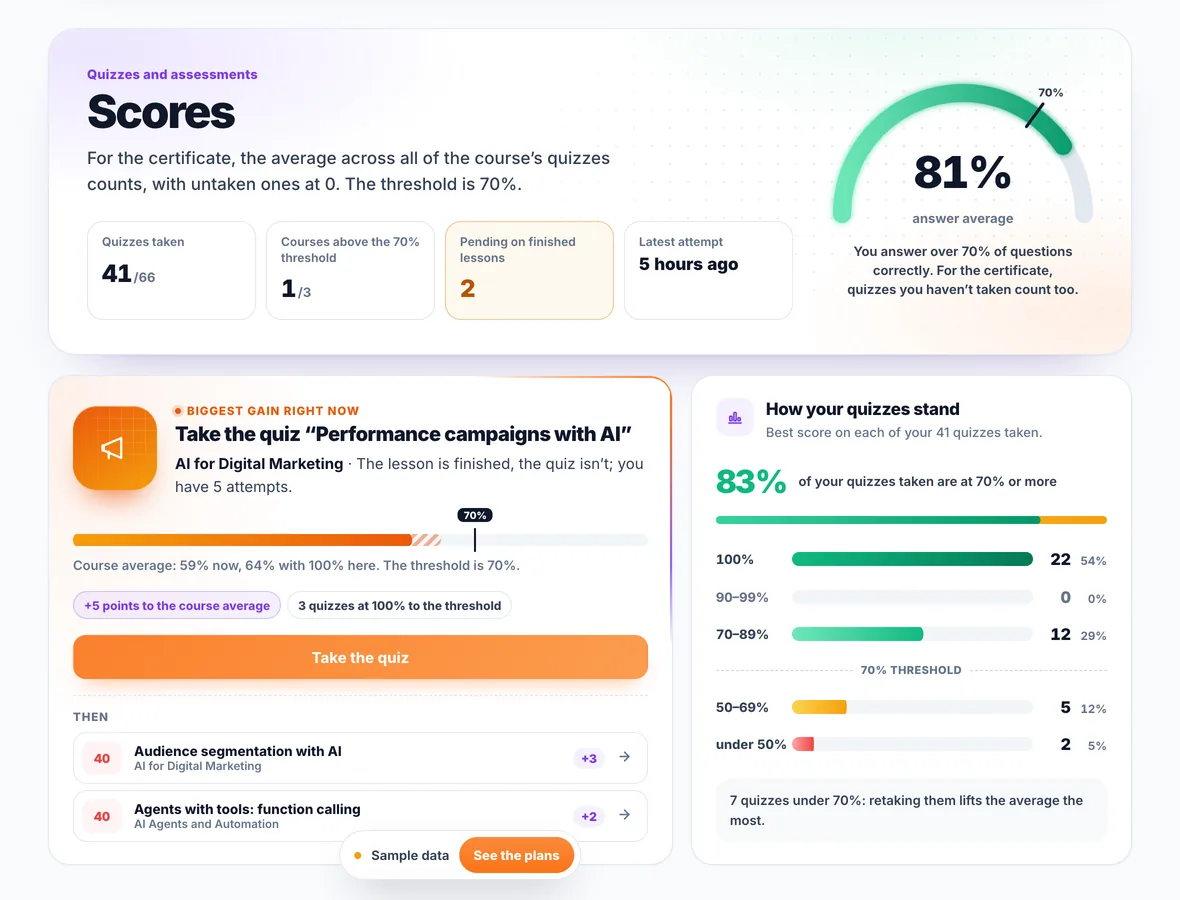
Almost every lesson ends with a quiz: multiple-choice or true/false questions and, in some courses, questions with a written answer, which receive a fixed partial score. After you submit, you see your score, the correct answer to the multiple-choice and true/false questions and, for most questions, the explanation.

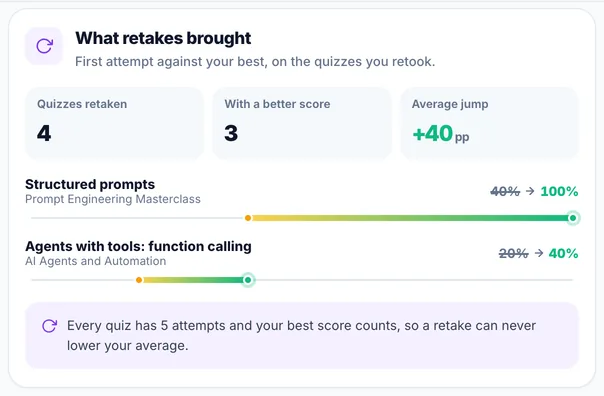
  • 5 attempts at every quiz, and your account keeps the best score: taking a quiz again cannot lower your average.
  • For the certificate, the course average is what counts: all the quizzes of the course, with the ones you have not taken counted as 0. The threshold is 70%.
  • The Scores page shows you the average for each course, your latest attempts and the quiz worth taking again first to raise your average.
  • AI Quiz, requested from the AI Professor in the lesson, is separate practice: it does not count towards your score.

On average, a course has ~354 questions: checking what you learned is part of the course, not a token test at the end.

Screenshot from the app demo, the Scores page. The data in the image is sample data.

Step 5 · Activity

You keep your pace: a weekly goal, a streak and medals

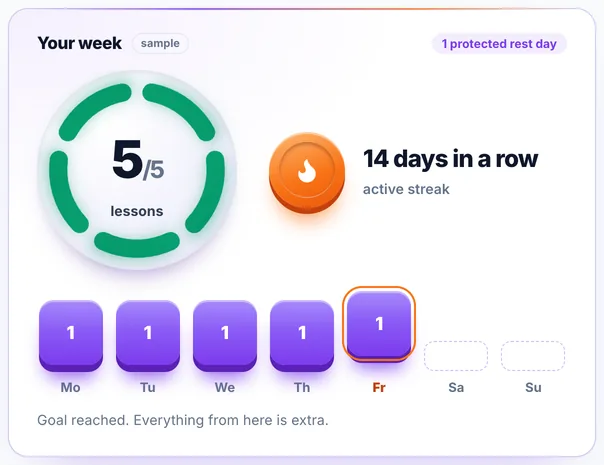
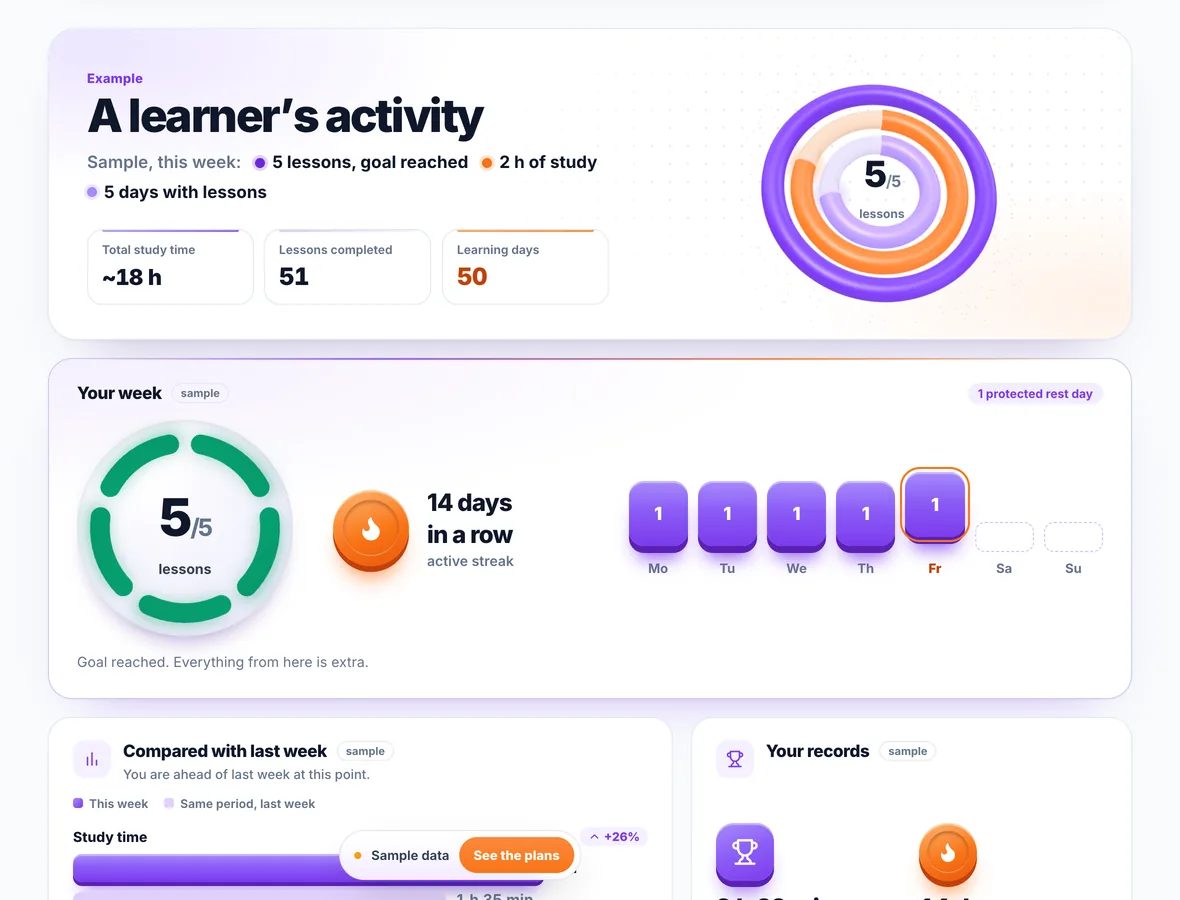
The Activity page shows you the current week against your goal, your streak of consecutive days, your study time, the activity map for the last 12 weeks and the log of the last 14 days.

  • A weekly goal you choose: 5 lessons by default; you change it at any time, from “Your week”.
  • The day streak grows every day you finish a lesson. You have one protected rest day per week: you can skip it without losing the streak.
  • 38 medals to unlock from what you already do on the platform: most of them in tiers, from bronze to diamond, and a few for learning habits.
  • Study planner: you choose the days and the time, then put them in your calendar (Google Calendar or an .ics file for Apple and Outlook).

Screenshot from the app demo, the Activity page. The data in the image is sample data.

Step 6 · Review

What you learned comes back in time, so it stays

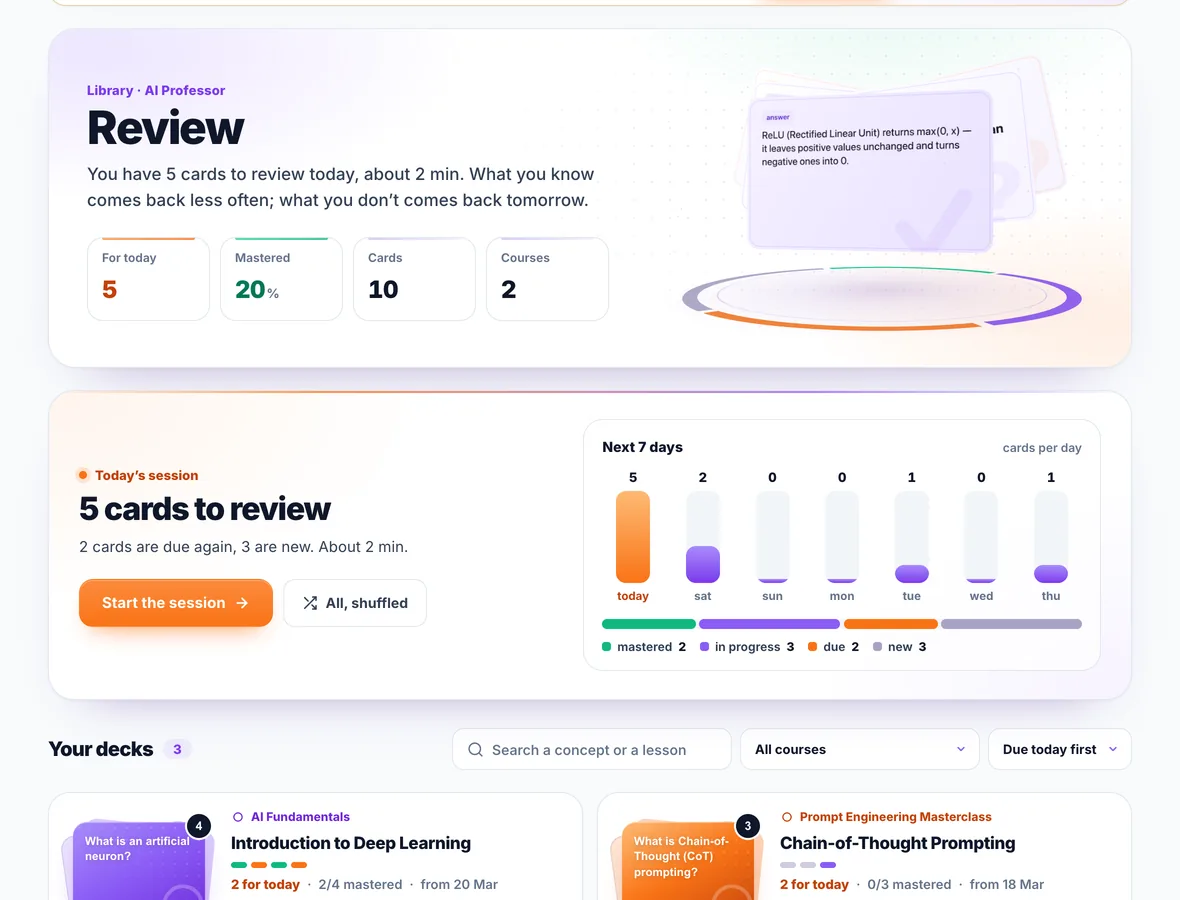
The Library keeps what you have worked on in one place: your review cards, your conversations with the AI Professor, your saved lessons with their notes and the articles you saved from the blog.

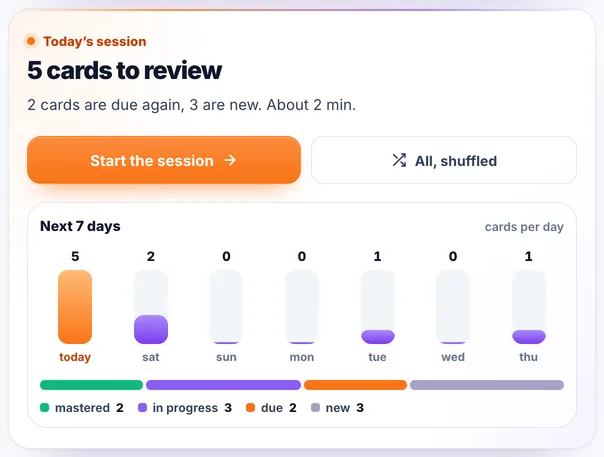
  • Flashcards with spaced repetition: what you know comes back less and less often, what you do not know comes back the next day. The cards are made from the lesson, when you ask the AI Professor for them.
  • Today’s session tells you how many cards you have to review and what is coming in the next 7 days.
  • Your conversations with the professor stay in your account: you continue them in the lesson, download them as a PDF or delete them.

Screenshot from the app demo, the Review page. The data in the image is sample data.

Step 7 · The certificate

You finish with the Certificate of Completion, which anyone can verify

Once you have finished every lesson of a course and have an average of at least 70% on its quizzes, you issue the certificate yourself, from your account: you confirm the conditions in the Certification policy and choose whether your name appears publicly. It is not issued automatically and it costs nothing extra: it is included in every plan and in per-course access, and it stays yours after your subscription ends.

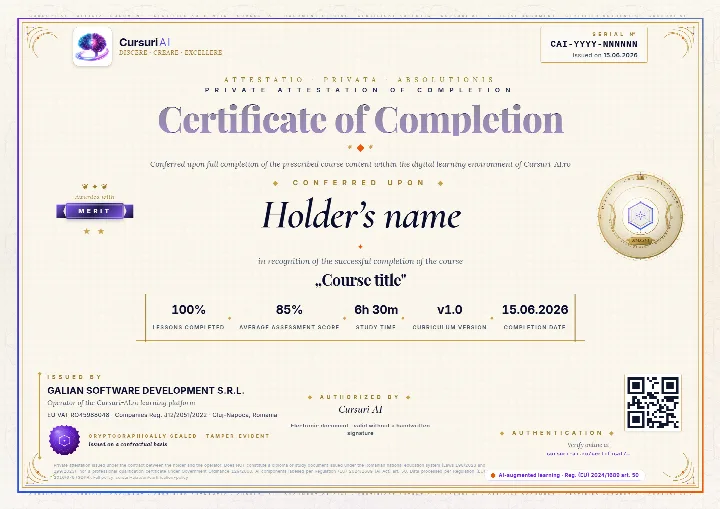
  • What it contains: the unique number (format CAI-YYYY-NNNNNN), your name, the course and its version, the percentage of lessons, the average score, the study time, the completion and issue dates, a QR code and the issuer.
  • Three tiers, by your quiz average: Pass, Merit (from 80%) and Distinction (from 90%).
  • Public verification: anyone who opens the link or scans the QR code sees the status, the course, the number, the dates, the tier and the results. Your name appears only if you choose so, and the verification pages are not indexed by search engines.
  • PDF, LinkedIn and CV: you download the document, add it to LinkedIn or copy the text for your CV. The certificates you make public also appear on your public profile.

It is a private attestation of completion issued by GALIAN SOFTWARE DEVELOPMENT SRL, the operator of the platform. It is not a diploma, a study document or a state-recognised qualification (Romanian Laws 198/2023 and 199/2023, Government Ordinance 129/2000, ANC); employers may take it into account at their own discretion. Certification policy · Verify a certificate

Example of a Cursuri AI Certificate of Completion with sample data: the serial number and the issue date in the top-right corner, the holder’s name, the course, the tier awarded, the percentage of lessons, the average score, the study time, the course version, the issuer and the verification QR code

The real document, an A4 PDF, shown here with sample data: the name, the course and the serial number are placeholders, and the QR code in the image is decorative.

Just as close at hand on any screen

  • Laptop, tablet, phone

    The app runs in the browser, with nothing to install. Your progress lives in your account, so you continue from any device; on a phone, the main menu sits in a bar at the bottom.

  • Quick search

    With ⌘K (Ctrl K on Windows) you search from any page through courses, lessons, your notes, your saved lessons and your conversations with the professor.

  • Dark mode

    You turn it on from the account menu or from Profile. Your choice is kept on the device where you made it.

The AI Professor is included in every plan and in per-course access

It is not a generic chatbot: it receives the lesson you are reading and answers starting from it. Usage is included in your subscription, with a fair-use limit calculated based on the complexity of requests; once you have used more than half of it, the professor panel shows you how much is left.

Choose your plan and start today

All prices include VAT. The AI Professor and the Certificate of Completion are included in every plan and in per-course access.

One course

When you care about a single topic in the catalog

€ 99 per month, VAT included No commitment: stop the renewal anytime

about €4 per hour of course

1 course, your choice of 50 25 hours on average
  • All the course’s lessons, exercises and quizzes, about 354 questions per course on average
  • AI Professor in the lessons, included in your subscription
  • Publicly verifiable Certificate of Completion

Business

Marketing, sales, HR, finance, management, legal. No programming.

€ 299 per month, VAT included Billed monthly: stop the renewal anytime

€12 per month for each of the 25 courses

25 Business courses 25 hours per course on average
  • AI for business, marketing and content, sales and CRM, HR, finance, operations, productivity with Copilot
  • Exercises built on real work scenarios, no code
  • AI Professor in every lesson, quizzes and a certificate for every course

IT Pro

Developers, data engineers, architects. Code and production.

€ 399 per month, VAT included Billed monthly: stop the renewal anytime

€16 per month for each of the 25 courses

25 IT Pro courses 25 hours per course on average
  • Prompt engineering, LLMs, RAG, AI agents and MCP, Claude Code and Cursor, computer vision, MLOps, AI security
  • Hands-on projects with production examples
  • AI Professor in every lesson, quizzes and a certificate for every course

All Access

Best value

The whole catalog, both tracks side by side.

€ 499 per month, VAT included Billed monthly: stop the renewal anytime

€10 per month for each of the 50 courses

All 50 courses about 1,257 hours
  • You save €199 a month compared with the two bundles bought separately
  • Learning paths for both profiles
  • AI Professor in every lesson, quizzes and a certificate for every course

Subscriptions renew automatically; you can stop the renewal anytime from your account, and access stays until the end of the period already paid for. As digital content with immediate access, see the withdrawal conditions.

Integrated
Secure payments powered by Stripe
We never see your card details
Accepted payment methods

Payments are processed by Stripe, a PCI DSS Level 1 certified provider, with 3-D Secure for payer authentication. The connection to this site is TLS-encrypted.

Compare all the plans, including the ones for teams.

Have a team? The same courses, administered in one place

Accounts for your employees, team progress tracking, reports for management and invoices issued to the company.

See the offer for companies
Frequently asked questions

Questions about how it works

Do I need a card to create an account?

No. You create the account with an email and password or with Google, Facebook or LinkedIn, without payment details. You pay only when you choose what to open: a single course or a plan. Payment is by card, through Stripe, and access starts right after confirmation.

What does the IT Pro plan include?

The IT Pro plan opens all 25 technical courses in the international catalog: AI engineering, LLM integration, RAG, AI agents, MLOps, deep learning and more. It is designed for developers, software engineers, data scientists and AI engineers.

What does the Business plan include?

The Business plan opens all 25 non-technical courses in the international catalog, accessible without programming knowledge: AI for business and management, marketing, productivity, operations and finance, and HR.

The whole catalog, both tracks, opens only with the All Access plan. Compare the plans.

Can I buy a single course, without a plan?

Yes. Any course can be accessed individually, with a monthly subscription, straight from the course page. Per-course access includes the lessons, the quizzes, the AI Professor and the Certificate of Completion for that course. The current price is shown on the pricing page.

How is a course structured and how long does it take?

Each course is split into modules, and each module into interactive text lessons with applied examples, followed by a quiz. A course has on average about 25 hours of content and 29 lessons, with over 300 quiz questions spread across the lessons. Courses are marked on four levels (Beginner, Intermediate, Advanced, Expert), and each course page lists the modules, the lessons and the duration.

You learn at your own pace, with no deadlines: progress is saved automatically, and every course lets you read a preview of the first lesson without an account.

How do the quizzes work?

At the end of lessons you answer multiple-choice or true/false questions and, in some lessons, questions with a written answer. After you submit, you see your score right away and, for most questions, the explanation of the correct answer. A quiz can be taken at most 5 times, and the best result is kept for each lesson. For the Certificate of Completion, the average of these results across the whole course must be at least 70%; quizzes you have not taken count as 0.

These are not a handful of token questions: a course has on average over 300 questions, spread across all its lessons.

What does the built-in AI Professor do?

The AI Professor is included in every plan and in per-course access and is available in every lesson. You ask it questions by text or voice, and you ask it for a summary of the key points or a quiz on the lesson, with explanations. It receives the lesson you are reading, so it starts from the course, not from scratch. How the AI Professor works.

It is an artificial intelligence system, not a human teacher, and its answers may contain errors. Usage is included in the subscription, with a fair-use limit calculated based on the complexity of requests; once you have used more than half of it, the professor panel shows you how much is left.

How do I get the Certificate of Completion?

When you have gone through all the lessons of a course and have an average of at least 70% on its quizzes, you issue the certificate from your account, after confirming the conditions in the Certification policy. It has a unique number, a QR code and a public verification page; you choose whether your name appears on the verification page and can change that choice at any time. Depending on the average, the certificate carries the Pass, Merit or Distinction level.

It is a private attestation of completion issued by GALIAN SOFTWARE DEVELOPMENT SRL, the operator of the Cursuri AI platform, not a diploma and not a state-recognised qualification. Details in the Certification policy.

Can I access the courses on my phone?

Yes. The platform runs in the browser, on laptop, tablet or phone, with nothing to install. Progress syncs automatically across devices, and the interface also has a dark mode.

Is my progress saved automatically?

Yes. The lessons you mark as finished, the quizzes, the scores, your notes and your saved lessons stay in your account. You can come back at any time and continue exactly where you left off: the Home page takes you straight to the next lesson.

How do the Activity page and the daily streak work?

The Activity page shows you the current week against your goal, your streak of consecutive days, the activity map for the last 12 weeks and the 38 medals you can unlock. The streak grows every day you finish a lesson, and one rest day per week is protected: you can skip it without losing the streak. The weekly lesson goal is 5 by default; you can change it at any time from “Your week”.

Can I unsubscribe at any time?

Yes, at any time, at no cost, from your account, with no other formality. Unsubscribing stops the automatic renewal: you keep access until the end of the period already paid for, after which nothing more is charged, and your progress stays saved in case you reactivate. Details in the Terms & Conditions.

Before you pay

You do not buy on trust

You read a free preview of the first lesson, with no account and no payment details. The level assessment is free too, from your account.

Read the free preview

After you pay

What you need to know about withdrawal

  • Access to the digital content starts immediately, with your express consent.
  • The price is not refunded for a change of mind (art. 16(m) of Romanian Government Emergency Ordinance no. 34/2014).
  • We refund, as required by law, in the event of an unremedied lack of conformity.
Details in the Terms & Conditions
You create the account without payment details

Now you know how it works. Take the first step.

A single course costs €99 per month. The Business plan is €299 per month, IT Pro €399, and All Access, the whole catalog of 50 courses, €499 per month, VAT included.

Immediate access after payment AI Professor included Stop the renewal anytime from your account

ChatGPT, OpenAI, Claude, Anthropic, Gemini, Google, Microsoft 365 Copilot, Cursor, Midjourney and the other product and company names mentioned are trademarks or trade names of their respective owners. Cursuri-AI.ro is an independent training provider and is not affiliated with, sponsored by or endorsed by any of them.