Cursor as a Pro: AI-Native IDE, Composer and Multi-Agent 2026 (Enterprise Edition)
Master Cursor 3 like a pro: Composer, model routing, Background Agents, Design Mode, MCP, enterprise security and team workflows. Updated September 2026.
The course’s skills. The same ones appear on your Certificate of Completion, so you can show what you covered.
Cursor 3 Fundamentals
Composer Mastery
Model Selection and Intelligent Routing
Background Agents and Cloud
Design Mode and Terminal-Driven Development
MCP and the Cursor Ecosystem
Code Quality and Security
Team Productivity and Enterprise
About the course
A complete program for using Cursor 3 at a professional level: setup and .mdc rules, Composer 2.5 mastery, model routing (35+ models), Background Agents and Cloud Agents, Design Mode, MCP, terminal-driven development, sandbox security, Teams/Enterprise, comparison with Copilot/Windsurf/Claude Code, power-user workflows and the 2026-2027 strategy.
Who it is for
For developers, engineers and technical professionals who build or integrate AI solutions. It belongs to AI for Developers, on the IT Pro track.
What you need
Expert level: for people who already work with AI in production.
Prompt Patterns for Enterprise Code: Architectures That Guide the AI55 min14 questions
Sandbox Security: Permissions, Network, and Agent Protection55 min14 questions
8
Module 8: Team Productivity and Enterprise
3 lessons · 2 h 45 min · 42 questions
Team Standardization: Shared Rules, Prompts, and Playbooks55 min14 questions
Teams and Enterprise: Admin, SSO, Analytics and Compliance55 min14 questions
Impact Metrics: How to Really Measure AI Efficiency in Your Team55 min14 questions
9
Module 9: Cursor vs the Competition
3 lessons · 2 h 40 min · 42 questions
Cursor vs GitHub Copilot vs Windsurf: AI IDEs Compared in Detail55 min14 questions
Cursor vs Claude Code vs OpenAI Codex: IDE vs Terminal Agent55 min14 questions
Adoption Strategies: How to Choose and Combine AI Tools for Your Team50 min14 questions
10
Module 10: Advanced Workflows and the Future
2 lessons · 1 h 50 min · 28 questions
Power User Workflows: Advanced Patterns for 10x Productivity55 min14 questions
Roadmap 2026-2027: From IDE to AI Development Platform55 min14 questions
11
Module 11: Appendix: Resources, 2026 Updates and Learning Paths
1 lesson · 32 min · 6 questions
Official Resources, 2026 Updates, and Learning Paths32 min6 questions
By email
Email me the course syllabus
Modules and lessons in order, plus the link to the preview of lesson 1 — so you can decide at your own pace.
Check your inbox
We sent a confirmation email to . One click there and we send you the course syllabus.
Not there? Check Spam or Promotions and move it to Inbox.
How you learn
You read the lesson, ask the AI Professor right on the page and check what you remember.
Lesson 1 · 55 min
Cursor 3 in April 2026: The AI-Native IDE Paradigm and the Agent Revolution
Most developers think an AI-powered IDE means an editor that autocompletes their lines of code better. On April 2, 2026, the Cursor team released version 3 and demolished exactly that assumption: a complete rebuild of the interface and architecture that does not add AI on top of an editor, but rebuilds the editor around AI.
The first lines of lesson 1 of this course.
Read the free preview, no account needed.
You read the lesson at your own pace
Written lessons, with examples and exercises. Your progress is saved automatically, so you can pick up where you left off.
You ask the AI Professor inside the lesson
Select a passage and it explains it, gives you an example or tells you why it matters. You can type or talk to it, in English.
You check what you remember
Every lesson has its own quiz, with explanations for the answers: 408 questions across the course. The professor also summarizes the lesson and prepares review flashcards.
You get the Certificate of Completion
Once you complete the lessons and reach the minimum quiz score, you issue it from your account, with a unique number, publicly verifiable.
The AI Professor is included in your subscription, per-course access included, with a monthly fair-use limit. It is an AI system, not a human teacher, and its answers may contain errors; details in the Terms. See how the AI Professor works.
You leave with proof anyone can check
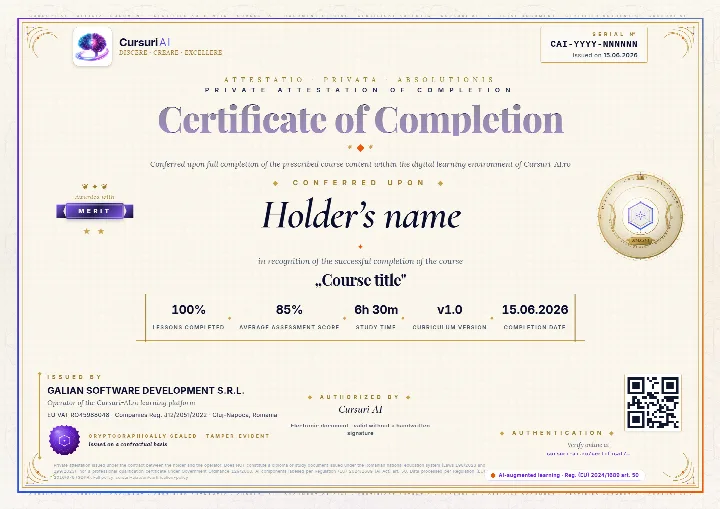
The Certificate of Completion for “Cursor as a Pro: AI-Native IDE, Composer and Multi-Agent 2026 (Enterprise Edition)”: a private attestation with a unique number and a QR code. A recruiter confirms it is authentic on the public verification page, with no account and no cost.
The real document, an A4 PDF, shown here with sample data. Yours carries your name, the course “Cursor as a Pro: AI-Native IDE, Composer and Multi-Agent 2026 (Enterprise Edition)”, the serial number, the issue date and the tier you earned; the QR code in the image is decorative.
Anyone can verify it
Public verification page, QR code and cryptographic fingerprint, with no account for the person checking.
You show it where it counts
Add it to your CV and LinkedIn profile; a recruiter confirms authenticity with one click.
It says exactly what it attests
The course, the tier you earned (Pass, Merit or Distinction), the serial number and the issue date, plus the percentage of lessons completed.
A private attestation of course completion. It is NOT a diploma or a state-recognised qualification under Romanian Laws 198/2023, 199/2023 or Government Ordinance 129/2000; employers may take it into account at their own discretion. Certification policy.
Pricing
Just this course or the whole IT Pro track
Billed monthly, in EUR. You can stop the renewal anytime from your account, and access starts right after payment. Prices are totals, with VAT included at the rate of your country.
Just this course
Cursor as a Pro: AI-Native IDE, Composer and Multi-Agent 2026 (Enterprise Edition)
€99per month, VAT includedNo commitment: stop the renewal anytime
Subscriptions renew automatically; you can stop the renewal anytime from your account, and access stays until the end of the period already paid for. As digital content with immediate access, see the withdrawal conditions.
About the course, the price, the AI Professor and the certificate.
What will I learn in “Cursor as a Pro: AI-Native IDE, Composer and Multi-Agent 2026 (Enterprise Edition)”?
A complete program for using Cursor 3 at a professional level: setup and .mdc rules, Composer 2.5 mastery, model routing (35+ models), Background Agents and Cloud Agents, Design Mode, MCP, terminal-driven development, sandbox security, Teams/Enterprise, comparison with Copilot/Windsurf/Claude Code, power-user workflows and the 2026-2027 strategy.
The course has 11 modules and 30 lessons, with 408 quiz questions. The full curriculum, module by module, is shown on the course page.
Do I need prior experience for this course?
Yes. The course is Expert level, for people who already work with AI in production.
How long does the course take?
The estimated duration is about 25 hours, across 30 lessons. You learn at your own pace, and your progress is saved automatically at every lesson, so you can pick up where you left off.
How much does it cost, and which plan do I need?
Access to this course alone costs €99 per month. The course is also included in the IT Pro bundle, €399 per month for all 25 IT Pro courses, and in All Access, €499 per month for the whole international catalog.
Plans are billed monthly, in EUR. Every price is a total, with VAT included at the rate of your country. Compare the plans.
Can I read part of the course before paying?
Yes. You can read a free preview of lesson 1, “Cursor 3 in April 2026: The AI-Native IDE Paradigm and the Agent Revolution”, without an account. The preview shows you how the lesson is written; the rest of the lesson and the other lessons open after payment.
How does the AI Professor help me in this course?
The AI Professor is built into every lesson and starts from the lesson you have open: it explains the passages you select, gives you examples, summarizes the lesson, tests you with a quiz and prepares review flashcards. You can type or talk to it, in English.
It is included in your subscription, per-course access included, with a monthly fair-use limit. It is an AI system, not a human teacher, and its answers may contain errors; details in the Terms.
Do I get a certificate when I finish the course?
When you meet the completion thresholds shown on the platform (lessons completed and the minimum quiz score), you can issue your Certificate of Completion for “Cursor as a Pro: AI-Native IDE, Composer and Multi-Agent 2026 (Enterprise Edition)” from your account, with a unique number, publicly verifiable on the site.
It is a private attestation of course completion, issued by GALIAN SOFTWARE DEVELOPMENT SRL. It is NOT a diploma or a state-recognised qualification under Romanian Laws 198/2023, 199/2023 or Government Ordinance 129/2000; employers may take it into account at their own discretion. Details in the Certification policy.
Does the subscription renew automatically? How do I stop it?
Yes. Course access and the bundles are subscriptions that renew automatically at the end of each monthly billing period. You can see the next renewal date in your account at any time.
You can stop the renewal at any time, from your account or by email, with no other formality. Access stays active until the end of the period already paid for, and no pro-rata refund is made for a period already started, except in the cases provided by law. Your progress stays saved in your account. Details in the Terms & Conditions, section 5.5.
Can my company buy this course for a team?
Yes. Company plans give a team access to the courses, with a dashboard where you follow each member’s progress and manage seats centrally. See the plans for companies.
From the same track
Similar courses
All of them are included in the IT Pro bundle, at about €16 per course, or you can take them separately, at €99 a month each.
Integrate LLMs into production apps: streaming, function calling, MCP, multi-model routing, cost optimization, security and observability. Updated for 2026.
“Cursor as a Pro: AI-Native IDE, Composer and Multi-Agent 2026 (Enterprise Edition)”: 30 lessons and about 25 hours of content, with your progress saved at every lesson.
Instant access after payment, on computer, tablet or phone.
AI Professor in every lesson, included in your subscription.
Certificate of Completion, publicly verifiable.
Just this course
€99/month
VAT included · stop the renewal anytime from your account
ChatGPT, OpenAI, Claude, Anthropic, Gemini, Google, Microsoft 365 Copilot, Cursor, Midjourney and the other product and company names mentioned are trademarks or trade names of their respective owners. Cursuri-AI.ro is an independent training provider and is not affiliated with, sponsored by or endorsed by any of them.