AI Video Creation and Editing: From Script to Publish
Learn AI video creation and editing in 2026: text-to-video (Runway, Veo, Kling, Sora), AI avatars, voice, editing tools and EU AI Act Article 50 disclosure.
The course’s skills. The same ones appear on your Certificate of Completion, so you can show what you covered.
The AI Video Landscape in 2026
Scriptwriting, Storyboarding and Pre-Production with AI
Text-to-Video Generation
Image-to-Video, Animation and AI Avatars
AI Voice, Narration and Lip-Sync
AI-Assisted Editing
Upscaling, Restoration and Finishing
Video for Social, YouTube and Ads
About the course
A premium, complete and hands-on course on creating professional video with artificial intelligence in 2026 — from the first script line to the published, measured result. Built for marketers, content creators, social media managers, entrepreneurs, agencies and communications teams, it maps the whole modern AI video toolstack and shows you how to actually use it: scriptwriting and storyboarding with large language models; text-to-video generation with tools such as Runway, Google Veo, Kling, Pika, Luma and OpenAI Sora; image-to-video and animation; AI avatars and talking heads with HeyGen and Synthesia; AI voice and narration with ElevenLabs plus dubbing and lip-sync; AI-assisted editing in Descript, CapCut and Adobe Premiere Pro; AI music and sound design; upscaling and restoration; and platform-specific delivery for short-form, YouTube and paid ads. A dedicated module covers the legal and ethical guardrails that matter most for AI video: consent for a person's likeness and voice, anti-deepfake and anti-impersonation rules, copyright over training data and assets, licensed music, and the EU AI Act Article 50 obligation to disclose and label AI-generated and manipulated media from 2 August 2026. You will build a repeatable end-to-end workflow and learn to measure and optimize what you ship. This is practical training, not legal advice.
Who it is for
For professionals who want to use AI in their everyday work, without writing code. It belongs to AI in Marketing, on the Business track.
What you need
Intermediate level: it helps to already know the basics of AI and of the course’s field. No programming required.
The 2026 AI Video Toolstack: A Field Map50 min12 questions
How Generative Video Actually Works: Frames, Prompts, Duration and Cost50 min12 questions
2
Module 2: Module 1 — Scriptwriting, Storyboarding and Pre-Production with AI
3 lessons · 2 h 30 min · 36 questions
Writing Video Scripts with AI That People Actually Watch50 min12 questions
Storyboarding and Shot Lists with AI50 min12 questions
Planning for Platform, Format and Audience50 min12 questions
3
Module 3: Module 2 — Text-to-Video Generation
4 lessons · 3 h 20 min · 48 questions
Text-to-Video Foundations and the Leading Tools50 min12 questions
Prompting for Text-to-Video: Speaking the Language of Cinematography50 min12 questions
Consistency, Seeds and Iterating Across Shots50 min12 questions
Managing Credits, Cost and Generation Failures at Scale50 min12 questions
4
Module 4: Module 3 — Image-to-Video, Animation and AI Avatars
3 lessons · 2 h 30 min · 36 questions
Image-to-Video: Animating Stills, Products and Logos50 min12 questions
AI Avatars and Talking Heads: HeyGen and Synthesia50 min12 questions
Consent, Likeness and Custom Avatars: The Non-Negotiable Rules50 min12 questions
5
Module 5: Module 4 — AI Voice, Narration and Lip-Sync
3 lessons · 2 h 30 min · 36 questions
AI Voiceover and Narration with ElevenLabs50 min12 questions
Voice Cloning, Dubbing and Lip-Sync — Done Responsibly50 min12 questions
Multilingual Video and Localization at Scale50 min12 questions
6
Module 6: Module 5 — AI-Assisted Editing
3 lessons · 2 h 30 min · 36 questions
Editing by Editing Text: Descript and the Transcript Workflow50 min12 questions
Auto-Captions, Auto-Cut and AI B-Roll50 min12 questions
AI Music and Sound Design50 min12 questions
7
Module 7: Module 6 — Upscaling, Restoration and Finishing
2 lessons · 1 h 40 min · 24 questions
Upscaling, Restoration and Frame Interpolation50 min12 questions
Finishing: Colour, Export and Quality Control50 min12 questions
8
Module 8: Module 7 — Video for Social, YouTube and Ads
3 lessons · 2 h 30 min · 36 questions
Short-Form Video: Reels, TikTok and Shorts50 min12 questions
Long-Form YouTube and Repurposing50 min12 questions
AI Video Ads and Brand Consistency50 min12 questions
9
Module 9: Module 8 — Legal and Ethical AI Video
3 lessons · 2 h 30 min · 36 questions
Copyright, Training Data, Music and Asset Licensing50 min12 questions
Consent, Likeness, Deepfakes and the EU AI Act Article 5050 min12 questions
Building a Legal-and-Ethical AI Video Governance Workflow50 min12 questions
10
Module 10: Module 9 — From Script to Publish: Workflow, Delivery and Measurement
3 lessons · 2 h 30 min · 44 questions
The End-to-End Workflow: From Script to Publish50 min20 questions
Measuring and Optimizing Your AI Video50 min12 questions
Building Your AI Video Studio: Stack, Budget, Team and SOPs50 min12 questions
11
Module 11: Final Quiz — AI Video Creation and Editing
1 lesson · 40 min · 28 questions
Final Assessment: From Script to Publish40 min28 questions
By email
Email me the course syllabus
Modules and lessons in order, plus the link to the preview of lesson 1 — so you can decide at your own pace.
Check your inbox
We sent a confirmation email to . One click there and we send you the course syllabus.
Not there? Check Spam or Promotions and move it to Inbox.
How you learn
You read the lesson, ask the AI Professor right on the page and check what you remember.
Lesson 1 · 50 min
What Every Creator Needs to Know About AI Video in 2026
Two years ago, generating a usable video clip from a sentence of text was a party trick — flickering frames, warped hands, five seconds of dreamlike nonsense. In 2026 it is a production tool.
The first lines of lesson 1 of this course.
Read the free preview, no account needed.
You read the lesson at your own pace
Written lessons, with examples and exercises. Your progress is saved automatically, so you can pick up where you left off.
You ask the AI Professor inside the lesson
Select a passage and it explains it, gives you an example or tells you why it matters. You can type or talk to it, in English.
You check what you remember
Every lesson has its own quiz, with explanations for the answers: 396 questions across the course. The professor also summarizes the lesson and prepares review flashcards.
You get the Certificate of Completion
Once you complete the lessons and reach the minimum quiz score, you issue it from your account, with a unique number, publicly verifiable.
The AI Professor is included in your subscription, per-course access included, with a monthly fair-use limit. It is an AI system, not a human teacher, and its answers may contain errors; details in the Terms. See how the AI Professor works.
You leave with proof anyone can check
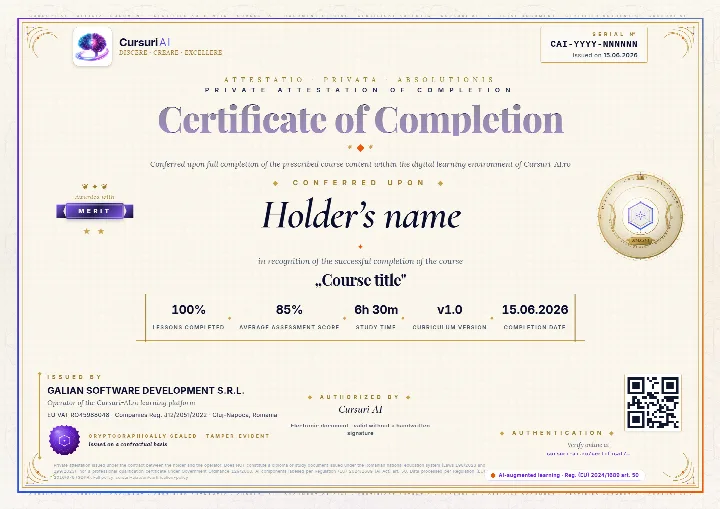
The Certificate of Completion for “AI Video Creation and Editing: From Script to Publish”: a private attestation with a unique number and a QR code. A recruiter confirms it is authentic on the public verification page, with no account and no cost.
The real document, an A4 PDF, shown here with sample data. Yours carries your name, the course “AI Video Creation and Editing: From Script to Publish”, the serial number, the issue date and the tier you earned; the QR code in the image is decorative.
Anyone can verify it
Public verification page, QR code and cryptographic fingerprint, with no account for the person checking.
You show it where it counts
Add it to your CV and LinkedIn profile; a recruiter confirms authenticity with one click.
It says exactly what it attests
The course, the tier you earned (Pass, Merit or Distinction), the serial number and the issue date, plus the percentage of lessons completed.
A private attestation of course completion. It is NOT a diploma or a state-recognised qualification under Romanian Laws 198/2023, 199/2023 or Government Ordinance 129/2000; employers may take it into account at their own discretion. Certification policy.
Pricing
Just this course or the whole Business track
Billed monthly, in EUR. You can stop the renewal anytime from your account, and access starts right after payment. Prices are totals, with VAT included at the rate of your country.
Just this course
AI Video Creation and Editing: From Script to Publish
€99per month, VAT includedNo commitment: stop the renewal anytime
Subscriptions renew automatically; you can stop the renewal anytime from your account, and access stays until the end of the period already paid for. As digital content with immediate access, see the withdrawal conditions.
About the course, the price, the AI Professor and the certificate.
What will I learn in “AI Video Creation and Editing: From Script to Publish”?
A premium, complete and hands-on course on creating professional video with artificial intelligence in 2026 — from the first script line to the published, measured result. Built for marketers, content creators, social media managers, entrepreneurs, agencies and communications teams, it maps the whole modern AI video toolstack and shows you how to actually use it: scriptwriting and storyboarding with large language models; text-to-video generation with tools such as Runway, Google Veo, Kling, Pika, Luma and OpenAI Sora; image-to-video and animation; AI avatars and talking heads with HeyGen and Synthesia; AI voice and narration with ElevenLabs plus dubbing and lip-sync; AI-assisted editing in Descript, CapCut and Adobe Premiere Pro; AI music and sound design; upscaling and restoration; and platform-specific delivery for short-form, YouTube and paid ads. A dedicated module covers the legal and ethical guardrails that matter most for AI video: consent for a person's likeness and voice, anti-deepfake and anti-impersonation rules, copyright over training data and assets, licensed music, and the EU AI Act Article 50 obligation to disclose and label AI-generated and manipulated media from 2 August 2026. You will build a repeatable end-to-end workflow and learn to measure and optimize what you ship. This is practical training, not legal advice.
The course has 11 modules and 31 lessons, with 396 quiz questions. The full curriculum, module by module, is shown on the course page.
Do I need prior experience for this course?
The course is Intermediate level: it helps to already know the basics of AI and of the course’s field. Business courses require no programming.
How long does the course take?
The estimated duration is about 26 hours, across 31 lessons. You learn at your own pace, and your progress is saved automatically at every lesson, so you can pick up where you left off.
How much does it cost, and which plan do I need?
Access to this course alone costs €99 per month. The course is also included in the Business bundle, €299 per month for all 25 Business courses, and in All Access, €499 per month for the whole international catalog.
Plans are billed monthly, in EUR. Every price is a total, with VAT included at the rate of your country. Compare the plans.
Can I read part of the course before paying?
Yes. You can read a free preview of lesson 1, “What Every Creator Needs to Know About AI Video in 2026”, without an account. The preview shows you how the lesson is written; the rest of the lesson and the other lessons open after payment.
How does the AI Professor help me in this course?
The AI Professor is built into every lesson and starts from the lesson you have open: it explains the passages you select, gives you examples, summarizes the lesson, tests you with a quiz and prepares review flashcards. You can type or talk to it, in English.
It is included in your subscription, per-course access included, with a monthly fair-use limit. It is an AI system, not a human teacher, and its answers may contain errors; details in the Terms.
Do I get a certificate when I finish the course?
When you meet the completion thresholds shown on the platform (lessons completed and the minimum quiz score), you can issue your Certificate of Completion for “AI Video Creation and Editing: From Script to Publish” from your account, with a unique number, publicly verifiable on the site.
It is a private attestation of course completion, issued by GALIAN SOFTWARE DEVELOPMENT SRL. It is NOT a diploma or a state-recognised qualification under Romanian Laws 198/2023, 199/2023 or Government Ordinance 129/2000; employers may take it into account at their own discretion. Details in the Certification policy.
Does the subscription renew automatically? How do I stop it?
Yes. Course access and the bundles are subscriptions that renew automatically at the end of each monthly billing period. You can see the next renewal date in your account at any time.
You can stop the renewal at any time, from your account or by email, with no other formality. Access stays active until the end of the period already paid for, and no pro-rata refund is made for a period already started, except in the cases provided by law. Your progress stays saved in your account. Details in the Terms & Conditions, section 5.5.
Can my company buy this course for a team?
Yes. Company plans give a team access to the courses, with a dashboard where you follow each member’s progress and manage seats centrally. See the plans for companies.
From the same track
Similar courses
All of them are included in the Business bundle, at about €12 per course, or you can take them separately, at €99 a month each.
Use AI across your sales process: predictive lead scoring, intelligent CRM, B2B prospecting, forecasting and team productivity. Hands-on course for 2026.
Generate images with AI: visual prompt engineering, Midjourney, Stable Diffusion, brand consistency, legal, ROI and hands-on tutorials. Updated for 2026.
ChatGPT, OpenAI, Claude, Anthropic, Gemini, Google, Microsoft 365 Copilot, Cursor, Midjourney and the other product and company names mentioned are trademarks or trade names of their respective owners. Cursuri-AI.ro is an independent training provider and is not affiliated with, sponsored by or endorsed by any of them.