The course’s skills. The same ones appear on your Certificate of Completion, so you can show what you covered.
Fundamentals: What AI Can and Cannot Do with Your Data
ChatGPT Advanced Data Analysis: Upload, Cleaning, Statistics and Charts
From Business Question to Insight: Formulating Requests on Tabular Data
Copilot in Excel: The COPILOT() Function, Natural-Language Formulas and Pivots
The Accessible Alternative: Excel Analysis Directly in ChatGPT (No Copilot License)
Introduction to Text-to-SQL for Non-Programmers
Verifying AI Output: How to Catch Invented Columns and Wrong Calculations
Confidentiality and Compliance: What Data NOT to Put in Cloud Tools
About the course
A premium course for non-technical professionals who want to analyze data with conversational AI, without writing a single line of code. You learn to ask questions in natural language and receive charts, descriptive statistics and conceptual SQL queries using ChatGPT Advanced Data Analysis, the COPILOT() function in Excel (with the Microsoft 365 Copilot license caveat) and an accessible alternative via direct file upload into ChatGPT. Covers formulating business requests on tables, text-to-SQL for non-programmers, rigorously verifying AI output (invented columns, wrong calculations, hallucinations), confidentiality and GDPR compliance (synthetic data, anonymization, the Enterprise tier with a DPA), EU AI Act art. 50 context and a complete applied project with reproducible synthetic data. All examples use synthetic data, with no fabricated figures presented as real. Does not provide regulated financial or accounting advice.
Who it is for
For professionals who want to use AI in their everyday work, without writing code. It belongs to AI Productivity, on the Business track.
What you need
Beginner level: you do not need prior experience with AI; the course starts from the basics. No programming required.
The limits of the models and human responsibility: when NOT to use AI on data52 min15 questions
8
Module 8: Confidentiality and Compliance: What Data NOT to Put in Cloud Tools
3 lessons · 2 h 42 min · 45 questions
GDPR in a nutshell for AI data analysis: what personal data is and why it matters54 min15 questions
Public tier vs Enterprise: DPAs, data retention, and how NOT to train the vendor's model "for free"55 min15 questions
Synthetic Data and Anonymization in Practice: Work Safely, Anytime53 min15 questions
9
Module 9: Applied Project: A Complete Mini Business Report, from Raw Data to Verified Insight
3 lessons · 2 h 48 min · 47 questions
The Project Brief and Synthetic Data: Preparing an "Orders + Clients" Dataset54 min16 questions
Executing the Analysis: Cleaning, Statistics, Segmentation, and Charts End-to-End58 min15 questions
Verification, the Final Report, and the Course Recap: A Trustworthy Deliverable56 min16 questions
10
Module 10: Appendix: Official Resources, 2026 Updates and Learning Paths
1 lesson · 35 min · 6 questions
Official Resources, 2026 Updates, and Learning Paths35 min6 questions
By email
Email me the course syllabus
Modules and lessons in order, plus the link to the preview of lesson 1 — so you can decide at your own pace.
Check your inbox
We sent a confirmation email to . One click there and we send you the course syllabus.
Not there? Check Spam or Promotions and move it to Inbox.
How you learn
You read the lesson, ask the AI Professor right on the page and check what you remember.
Lesson 1 · 50 min
What Conversational AI Can and Cannot Do With Your Data
A chart can look impeccable and, at the same time, be completely wrong. You get it in a few seconds by asking the AI for a visualization, you drop it into a presentation for leadership, and if a faulty aggregation sits behind it, nobody will challenge it anymore — because it looks convincing.
The first lines of lesson 1 of this course.
Read the free preview, no account needed.
You read the lesson at your own pace
Written lessons, with examples and exercises. Your progress is saved automatically, so you can pick up where you left off.
You ask the AI Professor inside the lesson
Select a passage and it explains it, gives you an example or tells you why it matters. You can type or talk to it, in English.
You check what you remember
Every lesson has its own quiz, with explanations for the answers: 394 questions across the course. The professor also summarizes the lesson and prepares review flashcards.
You get the Certificate of Completion
Once you complete the lessons and reach the minimum quiz score, you issue it from your account, with a unique number, publicly verifiable.
The AI Professor is included in your subscription, per-course access included, with a monthly fair-use limit. It is an AI system, not a human teacher, and its answers may contain errors; details in the Terms. See how the AI Professor works.
You leave with proof anyone can check
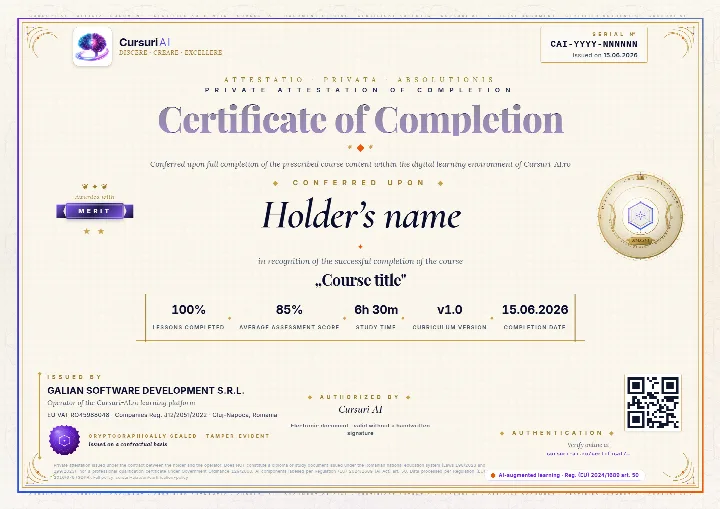
The Certificate of Completion for “No-Code Data Analysis with AI: ChatGPT, Excel and SQL for Non-Programmers”: a private attestation with a unique number and a QR code. A recruiter confirms it is authentic on the public verification page, with no account and no cost.
The real document, an A4 PDF, shown here with sample data. Yours carries your name, the course “No-Code Data Analysis with AI: ChatGPT, Excel and SQL for Non-Programmers”, the serial number, the issue date and the tier you earned; the QR code in the image is decorative.
Anyone can verify it
Public verification page, QR code and cryptographic fingerprint, with no account for the person checking.
You show it where it counts
Add it to your CV and LinkedIn profile; a recruiter confirms authenticity with one click.
It says exactly what it attests
The course, the tier you earned (Pass, Merit or Distinction), the serial number and the issue date, plus the percentage of lessons completed.
A private attestation of course completion. It is NOT a diploma or a state-recognised qualification under Romanian Laws 198/2023, 199/2023 or Government Ordinance 129/2000; employers may take it into account at their own discretion. Certification policy.
Pricing
Just this course or the whole Business track
Billed monthly, in EUR. You can stop the renewal anytime from your account, and access starts right after payment. Prices are totals, with VAT included at the rate of your country.
Just this course
No-Code Data Analysis with AI: ChatGPT, Excel and SQL for Non-Programmers
€99per month, VAT includedNo commitment: stop the renewal anytime
Subscriptions renew automatically; you can stop the renewal anytime from your account, and access stays until the end of the period already paid for. As digital content with immediate access, see the withdrawal conditions.
About the course, the price, the AI Professor and the certificate.
What will I learn in “No-Code Data Analysis with AI: ChatGPT, Excel and SQL for Non-Programmers”?
A premium course for non-technical professionals who want to analyze data with conversational AI, without writing a single line of code. You learn to ask questions in natural language and receive charts, descriptive statistics and conceptual SQL queries using ChatGPT Advanced Data Analysis, the COPILOT() function in Excel (with the Microsoft 365 Copilot license caveat) and an accessible alternative via direct file upload into ChatGPT. Covers formulating business requests on tables, text-to-SQL for non-programmers, rigorously verifying AI output (invented columns, wrong calculations, hallucinations), confidentiality and GDPR compliance (synthetic data, anonymization, the Enterprise tier with a DPA), EU AI Act art. 50 context and a complete applied project with reproducible synthetic data. All examples use synthetic data, with no fabricated figures presented as real. Does not provide regulated financial or accounting advice.
The course has 10 modules and 27 lessons, with 394 quiz questions. The full curriculum, module by module, is shown on the course page.
Do I need prior experience for this course?
No. The course is Beginner level and starts from the basics: you do not need prior experience with AI. Business courses require no programming.
How long does the course take?
The estimated duration is about 24 hours, across 27 lessons. You learn at your own pace, and your progress is saved automatically at every lesson, so you can pick up where you left off.
How much does it cost, and which plan do I need?
Access to this course alone costs €99 per month. The course is also included in the Business bundle, €299 per month for all 25 Business courses, and in All Access, €499 per month for the whole international catalog.
Plans are billed monthly, in EUR. Every price is a total, with VAT included at the rate of your country. Compare the plans.
Can I read part of the course before paying?
Yes. You can read a free preview of lesson 1, “What Conversational AI Can and Cannot Do With Your Data”, without an account. The preview shows you how the lesson is written; the rest of the lesson and the other lessons open after payment.
How does the AI Professor help me in this course?
The AI Professor is built into every lesson and starts from the lesson you have open: it explains the passages you select, gives you examples, summarizes the lesson, tests you with a quiz and prepares review flashcards. You can type or talk to it, in English.
It is included in your subscription, per-course access included, with a monthly fair-use limit. It is an AI system, not a human teacher, and its answers may contain errors; details in the Terms.
Do I get a certificate when I finish the course?
When you meet the completion thresholds shown on the platform (lessons completed and the minimum quiz score), you can issue your Certificate of Completion for “No-Code Data Analysis with AI: ChatGPT, Excel and SQL for Non-Programmers” from your account, with a unique number, publicly verifiable on the site.
It is a private attestation of course completion, issued by GALIAN SOFTWARE DEVELOPMENT SRL. It is NOT a diploma or a state-recognised qualification under Romanian Laws 198/2023, 199/2023 or Government Ordinance 129/2000; employers may take it into account at their own discretion. Details in the Certification policy.
Does the subscription renew automatically? How do I stop it?
Yes. Course access and the bundles are subscriptions that renew automatically at the end of each monthly billing period. You can see the next renewal date in your account at any time.
You can stop the renewal at any time, from your account or by email, with no other formality. Access stays active until the end of the period already paid for, and no pro-rata refund is made for a period already started, except in the cases provided by law. Your progress stays saved in your account. Details in the Terms & Conditions, section 5.5.
Can my company buy this course for a team?
Yes. Company plans give a team access to the courses, with a dashboard where you follow each member’s progress and manage seats centrally. See the plans for companies.
From the same track
Similar courses
All of them are included in the Business bundle, at about €12 per course, or you can take them separately, at €99 a month each.
Use AI for your 2026 job search: ATS-friendly resume, cover letters, LinkedIn, interview prep, salary negotiation, networking and upskilling — honestly.
AI for teachers in 2026: plan lessons, build materials, differentiate, create quizzes and give feedback with AI — plus student-data privacy and the EU AI Act.
“No-Code Data Analysis with AI: ChatGPT, Excel and SQL for Non-Programmers”: 27 lessons and about 24 hours of content, with your progress saved at every lesson.
Instant access after payment, on computer, tablet or phone.
AI Professor in every lesson, included in your subscription.
Certificate of Completion, publicly verifiable.
Just this course
€99/month
VAT included · stop the renewal anytime from your account
ChatGPT, OpenAI, Claude, Anthropic, Gemini, Google, Microsoft 365 Copilot, Cursor, Midjourney and the other product and company names mentioned are trademarks or trade names of their respective owners. Cursuri-AI.ro is an independent training provider and is not affiliated with, sponsored by or endorsed by any of them.